





Fashion Photography Services





E-commerce Photography




A high-volume production guide for apparel brands, Myntra sellers and catalogue managers who need 50, 100 or 200+ SKUs to look like one disciplined collection.
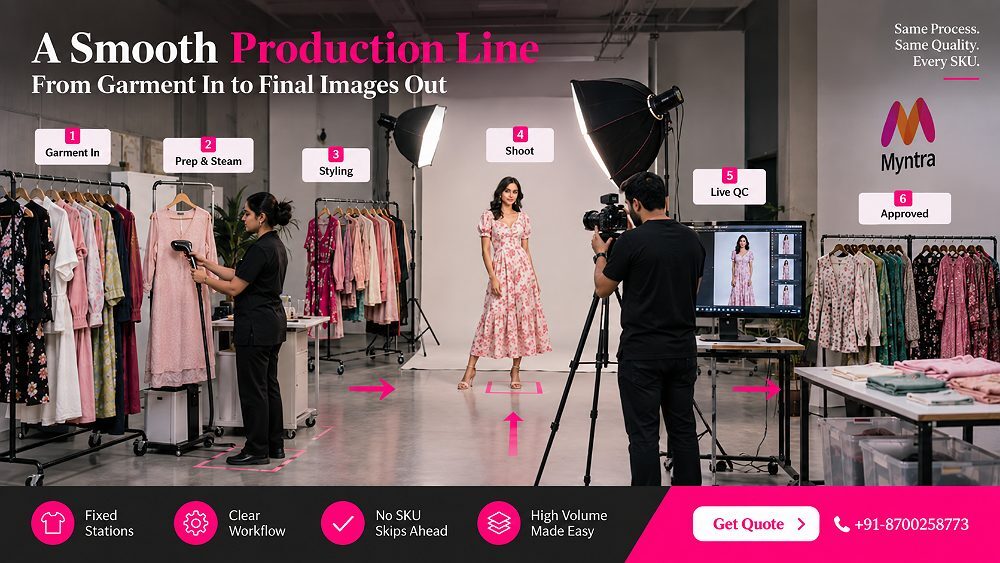
Myntra Catalogue Model Photography is not really about capturing one beautiful garment. It is about producing fifty, a hundred or two hundred product images that look like they belong to a single, disciplined collection. Any competent photographer can light one kurti well. The real skill, and the real business problem, is keeping the model, the framing, the crop and the styling identical from the first SKU of the morning to the last SKU after lunch. That repeatability is what separates a professional Myntra model catalogue shoot from a folder of pretty but mismatched pictures.
At Ckstudio, most of the catalogue reshoots we are called in to rescue do not fail because of bad lighting. They fail because nobody locked the production system before the shoot began. This guide fixes that. It walks through the exact Myntra model shoot workflow we use for high-volume catalogues: shot sequencing, SKU control, garment prep, capture, file naming, editing and quality control. One important note before we start: live Myntra category requirements can change, so always confirm the current specifications for your category before building your final shot list.
Myntra catalogue model photography is a repeatable ecommerce production system in which every SKU follows a planned shot order, a consistent model presentation, locked framing, controlled garment preparation, standardized editing and a final QC pass before delivery. The goal is not one perfect image — it is a whole collection that looks visually identical across every product page.
Individual image quality is only one requirement, and honestly it is the easy one. The hard requirement is collection consistency. As your SKU count climbs, lighting, cropping, model posture, styling and garment placement all have to stay repeatable across hundreds of frames — and human beings naturally drift. A model stands slightly differently after her fortieth outfit. An assistant crops one product a little tighter. Suddenly your catalogue looks like three separate shoots stitched together.
The core pain points brands bring to us are always the same: framing changing from one SKU to another, the model’s appearance drifting through the day, garment positioning inconsistencies, missing required views, confusing file naming, products getting mixed during large shoots, and marketplace QC rejections that force repeated reshoots. A good production process is designed to prevent these errors on set rather than discover them weeks later during editing. If you want the marketplace-specification side of this, our Myntra photography guidelines resource covers the image rules in detail; this article stays focused on production.
A five-piece shoot forgives improvisation. A hundred-piece Myntra model catalogue shoot punishes it. More garments create more opportunities for mismatched poses and misfiled images. Models fatigue, so posture and expression slip. Styling continuity can drift as different assistants dress each look. Products get photographed out of sequence, details get forgotten, and file association — which image belongs to which SKU — quietly becomes the single biggest source of chaos.
The brands that scale cleanly treat a large shoot as a factory line, not an art session. They plan for scaling from dozens to hundreds of SKUs before the first frame, and they measure success in completed products, not raw shutter clicks.
Requirements can differ by category, and they are updated more often than most sellers expect. Build your production sheet from the current seller and category instructions inside the Myntra Partner Portal, not from an old shoot’s brief. Reusing last season’s requirements is one of the most common reasons a technically clean catalogue still gets flagged. Treat the live portal and QC instructions as the final operational reference, and treat everything in this guide as production best practice layered on top of those rules. When rejections do happen, our Myntra QC rejection and reshoot checklist helps diagnose the exact cause.
The heart of a scalable catalogue is a fixed shot sequence — the same ordered set of views captured for every comparable garment. When the sequence is fixed, the photographer stops thinking about “what to shoot next” and starts thinking only about executing it cleanly. That single change is what lets a studio move from twenty SKUs a day to sixty. A repeatable Myntra model shoot shot list also makes editing and QC dramatically faster, because every folder contains exactly the same views in exactly the same order.
Below is the practical shot order we use as a default for apparel. It is a starting framework — your final views must still match the current requirements for your specific Myntra product category — but the sequence itself rarely needs to change.
The primary front model image is the hero of the listing. It should show the full garment silhouette on the model with correct posture, a straight camera and clean framing. This is the image the shopper sees first, so it sets the standard for the entire catalogue.
The back view reveals garment construction, closures, drape and fit that the front cannot show. In a Myntra model catalogue shoot this view is where quality perception is either won or lost, especially for structured apparel and ethnic wear.
A three-quarter model pose adds dimension and communicates fit, flow and volume. It bridges the flat front and back images and makes the product feel real, which is exactly what apparel catalogue photography needs to reduce buyer hesitation.
The detail shot is your zoom into fabric texture, print, embroidery or trims. Strong fabric detail photography answers the questions that cause returns — “is the material good, is the print real” — and it is often the frame that converts a hesitant shopper.
The alternate or styled apparel image shows the garment in a slightly different pose or styling context. In Myntra fashion catalogue photography this frame adds personality without breaking the consistent, clean base sequence used across the whole collection.
Beyond the core five, additional catalogue images — movement shots, close product features, layering details — should be determined by the garment, the category and the current marketplace instructions. Do not add extra views uniformly across a whole collection unless the category genuinely benefits; extra frames multiply editing time fast. Add them where the product features demand it and skip them where they do not.
The rule is simple: do not improvise the pose order for each garment. Use a printed shot checklist. The photographer calls the shot number out loud, an assistant marks completion, and the model resets to the reference position between shots. A garment only proceeds to the next station once all required views are confirmed captured. This tiny discipline — calling and marking every shot — is the difference between a catalogue that flows and one that falls apart in QC.
| Shot | Recommended View | Production Goal | Consistency Check | QC Check |
|---|---|---|---|---|
| 1 | Front | Hero listing image | Camera height & crop locked | Sharp, straight, full silhouette |
| 2 | Back | Show construction & fit | Same distance as front | Closures & drape visible |
| 3 | Three-quarter | Add dimension | Same pose reference | Fit & flow clear |
| 4 | Detail | Fabric / print / trims | Same lighting | Texture in focus |
| 5 | Alternate / styled | Personality frame | Same styling base | On-brand, not off-sequence |
| 6 | Category-specific optional | Feature-driven | Only where needed | Justified by product |
If the shot sequence is the skeleton, the consistency system is the nervous system. This is the part most competing guides skip entirely, and it is exactly where high-volume catalogues succeed or collapse. Consistency is not a talent — it is a set of locks you apply before production and never touch again. Get these locks right and a 100-SKU Myntra clothing catalogue photography project looks like one seamless shoot.
Five things get locked before the first production SKU is photographed. Once locked, they stay untouched for the entire batch.
Fix camera height, distance, focal length and crop before you begin, and mark the tripod position. Every front image must sit at the same scale so headroom, body proportion and crop stay identical. This single lock removes the most visible inconsistency in any catalogue.
Set and meter your studio lighting once, then leave it. Consistent lighting is what gives you reliable colour accuracy across the collection, which in turn keeps editing simple and prevents the “every image looks slightly different” problem that triggers marketplace QC issues.
Mark the model’s floor position with tape and shoot a reference frame. The model returns to this exact mark for every SKU. A visible pose reference keeps posture and body angle repeatable even as the model gets tired late in the day.
Lock hair and makeup once and photograph a styling reference. Model continuity depends on this — changing a hairstyle midway through a Myntra catalogue shoot instantly makes the collection look like two separate sessions and is almost impossible to fix in editing.
Every garment gets the same preparation: steaming, lint removal, correct fit adjustment and consistent tucking or styling. Sloppy garment preparation is the hidden reason many catalogue images look uneven even when the photography itself is perfect.
Before you shoot the whole collection, photograph one representative garment first and get every decision signed off on it: framing, posing, light, background, crop and styling. We call this the Ckstudio Master-SKU Lock. Once the client approves the master SKU, its images stay visible on a monitor throughout production as the living reference every subsequent product is matched against.
This one habit saves more time than any other. Fixing one master image before production is trivial; fixing a hundred inconsistent SKUs afterwards is a second shoot. The master SKU is your contract with consistency — and it is the fastest way to keep a large ecommerce catalogue photography project on schedule.
Send Ckstudio your SKU count and required image sequence, and the team will map the exact production workflow, model plan and timeline for your collection.
WhatsApp +91-8700258773 Get a Catalogue PlanGreat catalogue days are won before the lights turn on. Pre-production is where you decide whether the shoot flows or stalls, and it is the stage brands most often underinvest in. For serious volume, four steps are non-negotiable.
Everything hangs off one document: the SKU master sheet. This is your live catalogue tracker, and it should exist as a shared spreadsheet before a single sample arrives. Every SKU is a row, and every stage of its life is a column you can tick.
Recommended columns: SKU Code, Style Name, Category, Colour, Size Sample, Model, Required Views, Special Detail, Shoot Status, Reshoot Status, Editing Status, Final QC and Delivery Filename. When this sheet is disciplined, nothing gets forgotten — missing shots, pending reshoots and unedited SKUs are all visible at a glance.
Inspect samples the day before, not on the shoot morning. Check for stains, loose threads, missing buttons, stubborn wrinkles, incorrect samples, visible product labels and damaged packaging. A garment that reaches the set with a defect either creates a reshoot or wastes retouching time. Clean sample intake is a core part of any professional garment photoshoot process.
Do not shoot in random order. Batch SKUs so the setup changes as little as possible. Our default batching logic is: Category, then Model, then Styling, then Lighting, then Colour family, then any special detail requirement. Group all similar garments together so the model, styling and lighting stay put while dozens of products flow through.
The alternative — changing the entire setup between every garment — is the single biggest time-killer in high-volume apparel photography. Smart batching can double completed-SKU throughput without touching image quality, which is exactly what a fashion catalogue production plan should optimise for.
Lock every reference before the shoot day: the approved model, makeup reference, hair reference, footwear, accessories, a pose sheet, the garment shooting order and a printed call sheet. When the model arrives, there should be zero decisions left to make — only execution. This is the same rigour we apply to any model photoshoot, scaled up for catalogue volume.
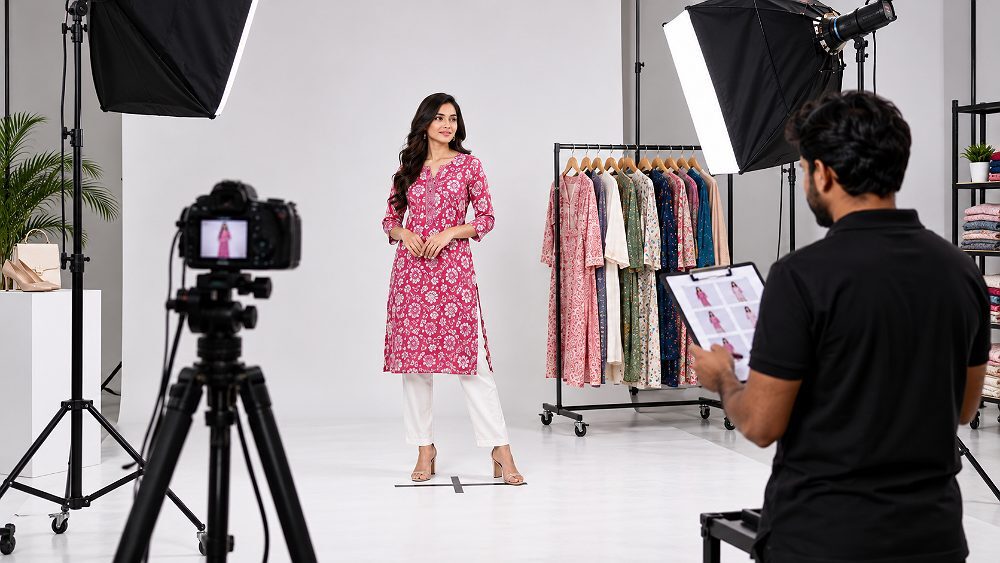
On the day, the studio should behave like a production line, not a creative jam. Each garment moves through fixed stations, each station has one job, and no SKU skips ahead. This is how you keep hundreds of products flowing without losing track of a single one.
Set up seven clear stations: (1) incoming garment station, (2) steaming and preparation, (3) styling and model dressing, (4) photography, (5) live image review, (6) completed-SKU rack, and (7) a separate reshoot or problem rack. Garments physically move left to right. When every product has a known physical location, nothing gets mixed and nothing gets lost in a high-volume catalogue shoot.
Finish a product fully — all required views captured and reviewed — before the next garment enters the frame. Half-finished SKUs are how images end up mislabelled: a front from one product accidentally files with the back of another. Completing each SKU end to end keeps the shot sequence and the file association airtight.
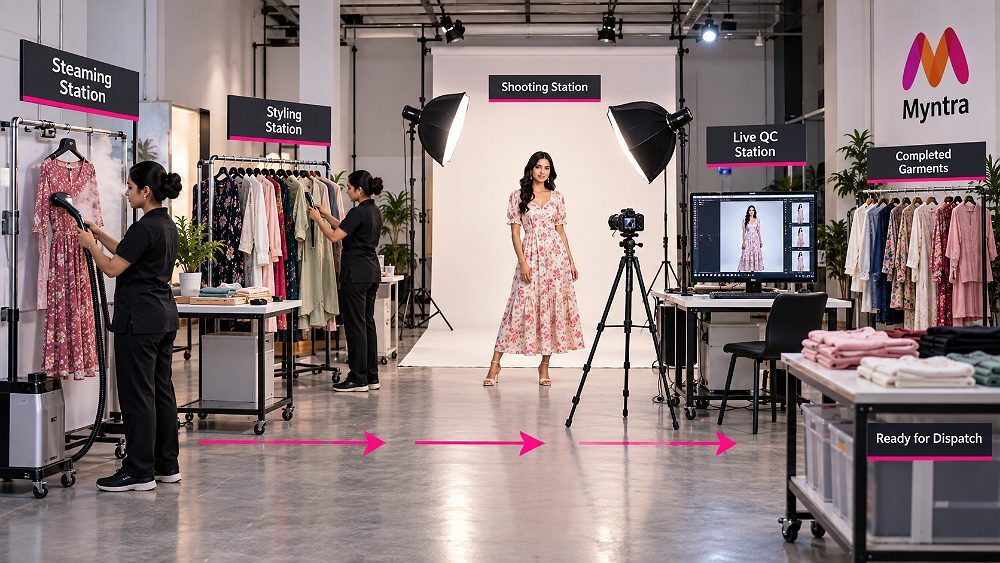
Before any product moves to the completed rack, one person runs a live QC check: front captured, back captured, alternate captured, relevant detail captured, focus sharp, garment shape correct, styling clean, colour matching the reference and pose consistent. Catching a fault while the model and garment are still on set costs seconds. Catching it in editing costs a full reshoot day.
If something is wrong, flag it on the SKU master sheet the moment it is spotted and move the garment to the reshoot rack. Never rely on memory at the end of a 100-SKU shoot — by frame four hundred, nobody remembers that SKU 37’s back shot was soft. Immediate marking is what keeps reshoot control from turning into a second production.
Seeing the workflow in motion makes it click. The behind-the-scenes video above shows how model positioning, garment changes, locked lighting, camera placement and SKU-by-SKU production actually work on set — and how the station line keeps everything moving without a single mixed-up product. It is the clearest way to understand why a planned ecommerce photography workflow beats improvisation every time.
Photography is only half the job. The operational layer after the shutter — naming, editing and collection-level QC — is where most catalogues quietly lose consistency. A disciplined post-production system is what turns raw frames into upload-ready assets without introducing new errors.
Name files by formula, never by hand. Our default pattern is BRAND-SKU-COLOUR-VIEW-SEQUENCE.jpg, for example brand-MN342-black-front-01.jpg, brand-MN342-black-back-02.jpg, brand-MN342-black-threequarter-03.jpg and brand-MN342-black-detail-04.jpg. Predictable filenames make missing or duplicate images instantly visible and make marketplace upload almost error-proof. Final marketplace naming should still follow the client’s current catalogue-upload specification.
Just as you shoot a master SKU, you edit a master image. Approve exposure, skin treatment, background, colour, contrast, crop, garment accuracy and shadow style on one frame first. Every other image is then matched to that approved reference. This keeps image editing consistent across the entire collection instead of drifting SKU by SKU.
This is a line we never cross. Retouch dust, temporary wrinkles, stray threads and distractions freely — but never change the actual product design, fit, print or colour. Altering the garment misleads the buyer, drives returns and damages trust. Honest garment colour accuracy is both an ethics rule and a returns-reduction strategy, and it is central to reducing the kind of mismatch that fuels returns from inaccurate product images.
Individual images can each pass and the collection can still look wrong. So after image-level checks, review the whole set as a grid and compare body scale, headroom, crop, background, brightness, skin tone, garment colour and pose sequence across SKUs. Collection-level QC is the final safeguard that makes a Myntra catalogue feel like one intentional collection rather than a pile of good-but-unrelated pictures.
| QC Area | Single Image Check | SKU Check | Collection Check |
|---|---|---|---|
| Framing | Straight & sharp | All views framed alike | Same scale across SKUs |
| Exposure | Correct brightness | Even across views | Uniform across grid |
| Colour | Matches garment | Consistent per SKU | No colour drift |
| Model consistency | Clean pose | Same pose reference | Continuity maintained |
| Garment accuracy | True to product | No design change | Honest across set |
| Background | Clean edges | Same tone | Identical everywhere |
| File naming | Correct formula | Sequence intact | No gaps or dupes |
| Shot completeness | In focus | All views present | No missing SKU |
Once the production system is clear, planning models, time and cost becomes far more predictable. The brands that budget well think in completed SKUs, not in shoot hours or raw frames.
For a cohesive Myntra model catalogue, using the same model across the collection is usually the right call — it protects continuity of body type, fit reference and overall feel. Weigh collection continuity against model availability, garment fit, target consumer and scheduling, and always have a backup plan. When one model carries a full fashion catalogue, the whole set gains an instant, effortless consistency.
Frame count is a vanity metric. Completed, QC-passed SKUs are the number that matters. Track a handful of real KPIs: completed SKUs per hour, reshoot percentage, average setup-change time, missing-shot rate, first-pass QC percentage and editing turnaround. These tell you honestly how efficient a shoot really is and where the bottleneck lives.
Very large collections often span several days, and the risk multiplies: day two must match day one exactly. Carry forward everything — lighting references, camera settings, set measurements, model notes, styling references and the approved master SKU images. Prioritising day-to-day visual consistency is what keeps a multi-day Myntra catalogue photoshoot looking like a single unbroken shoot.
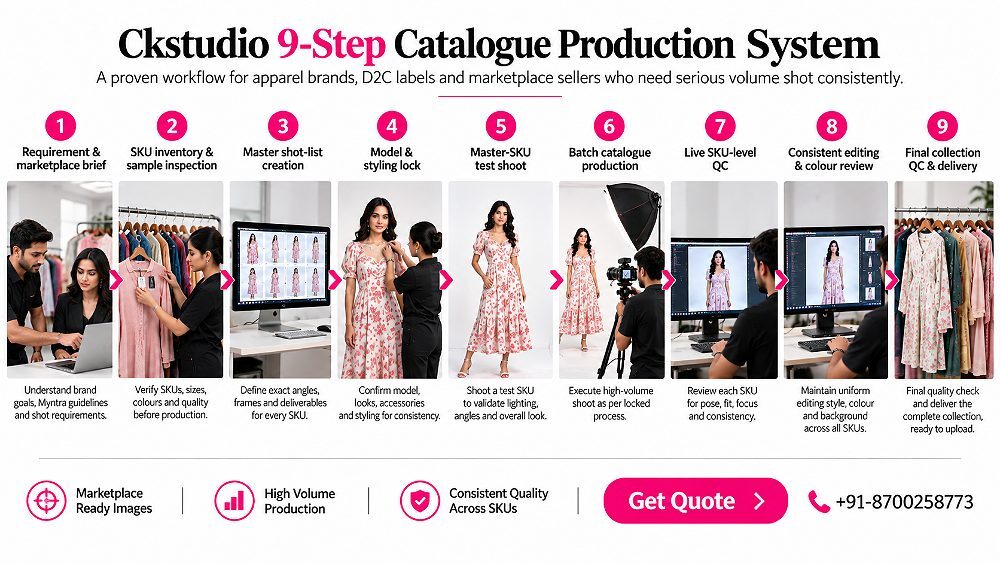
Everything above comes together in one repeatable framework. This is the Ckstudio 9-Step Catalogue Production System we run for apparel brands, D2C labels and marketplace sellers who need serious volume shot consistently.
This system is why a Delhi NCR ecommerce catalogue shoot stays predictable whether it is twenty SKUs or two hundred. The framework does not change with volume — only the batch size does.
This workflow is built for manufacturers, D2C brands, garment exporters, marketplace sellers, collection launches, agencies and ecommerce operations teams — anyone with recurring or large apparel catalogues across Delhi, Delhi NCR, Noida, Gurgaon or Faridabad. If your catalogue is five products, you do not need this. If it is fifty or five hundred, this is the only way it stays clean.
Almost every expensive reshoot traces back to a short list of avoidable mistakes. Knowing them in advance is half the cure, so build your process specifically to prevent each one.
Every item on that list is prevented by something earlier in this guide — the master SKU, the locked framing, the station line, the live QC gate and the SKU master sheet. That is the whole point of a system: it turns “remember to do this” into “the process does this automatically.”
Run this checklist before a single image goes to the marketplace. If every box is ticked, your Myntra catalogue is upload-ready and QC-safe.
Catalogue pricing is never one flat number, because a five-SKU shoot and a two-hundred-SKU production are completely different operations. The indicative starting rates below give you a realistic sense of structure; final pricing always depends on SKU count, images per SKU, model requirement, styling, garment category, complexity and delivery timeline.
From ₹75/image
From ₹150/image
From ₹450/SKU
Custom — 50+ SKUs
Present these as indicative starting rates only. For an exact figure, send us your SKU count, garment category and required images per SKU at [email protected] or call +91-8700258773, and you will get a production-ready catalogue quote rather than a vague estimate. A detailed cost breakdown by category is also in our product photography pricing guide.
After years of catalogue production, a few lessons repeat on every large shoot. Consistency problems almost always begin in pre-production, not in editing — if the day starts messy, no amount of retouching saves it. A well-approved master SKU saves far more time than fixing a hundred inconsistent products later. Live QC on set prevents the expensive reshoots that eat margins.
We have also learned that the client’s own preparation matters as much as ours: a clean SKU sheet delivered before production removes half the on-set friction instantly. Model continuity becomes more important, not less, as collections grow. And the single most valuable habit is reviewing the entire collection as a visual grid before final delivery — the eye catches drift that image-by-image checking misses. Ckstudio has run this colour-managed, high-volume SKU workflow as a Delhi ecommerce studio operating since 2017, and Prince still personally reviews the final grid on major catalogues before anything ships. If you want the marketplace-rules companion to this production guide, keep our Myntra guidelines reference open alongside it.
Share your product category, SKU count, model requirement and expected launch date, and the studio will send back a production-ready catalogue estimate and workflow plan. Call Prince directly, message on WhatsApp, or email [email protected].
Call Prince — +91-8700258773 WhatsApp UsQuick answers to the questions apparel brands and Myntra sellers ask most often before booking a high-volume catalogue model shoot.
Myntra Catalogue Model Photography is a structured on-model ecommerce photography process designed to produce consistent product images across multiple apparel SKUs using standardized framing, poses, styling, editing and quality control.
A practical catalogue workflow normally begins with the main front view, followed by back, side or three-quarter, product-detail and alternate views. The final shot list should always match the current requirements for the specific Myntra product category.
Lock the camera position, lighting, model position, framing, styling and shot order before production. Use one approved master SKU as the visual reference and track every SKU through a live production and QC sheet.
Organize images using SKU-based folders and predictable filenames containing the SKU, colour, view and sequence number. This reduces upload errors and makes missing or duplicate catalogue images easier to identify.
Myntra catalogue photography pricing depends on SKU volume, model selection, number of images, styling, garment complexity and turnaround. High-volume collections should normally be quoted by SKU or production batch rather than as isolated photographs.
For deeper image-SEO and filename best practice, Google’s own image SEO documentation is worth a read, and for product identification and SKU/GTIN context you can refer to GS1 India.

