

Fashion Photography Services



E-commerce Photography
A B2B operations playbook from Ckstudio — how India’s fastest-growing D2C brands and marketplace sellers keep every SKU visually identical across 500, 1000, even 5000 products, without turning photography into a bottleneck.
If you run a growing D2C brand or a marketplace-heavy operation, Ecommerce Catalog Photography is not a creative problem — it is a manufacturing problem. Ten SKUs are easy. A hundred SKUs are manageable. But the moment your catalog crosses 500 products, every small inconsistency — a slightly warmer white background here, a 2mm tighter crop there, a green cast in one batch of jewellery — starts multiplying into a brand-wide credibility issue. This playbook is the exact operating system Ckstudio uses to keep thousands of SKUs looking like they were shot on the same day, in the same light, by the same eye — because in a good ecommerce photography services operation, they usually are, and when they are not, it should still look that way to the customer.
Ecommerce Catalog Photography is the disciplined, repeatable production of hundreds or thousands of product images under a single visual standard — a standard covering framing, focal length, background, lighting, colour temperature, shadow density, retouching depth and file specifications. It is fundamentally different from one-off product photography. A single hero shot is a creative exercise. A 2000-SKU catalog is an operations exercise. When Ckstudio’s team takes on a bulk brief for a footwear or beauty brand, the first artefact we build is not a moodboard — it is a written SOP that any shooter on any day can execute identically, so that SKU 47 and SKU 1847 look like siblings on a Myntra grid, not distant cousins.
The stakes rise sharply once your catalog grows past a hundred products. Shoppers scanning a listing grid pick up on inconsistency subconsciously — an off-tone background, a size mismatch, a shadow tilting the wrong way — and it registers as “cheap” long before it registers as “different.” That is why serious brands treat ecommerce photography services as a compliance layer, not a marketing spend. It’s also why the ecommerce product photography standards across Amazon India, Flipkart and Myntra all revolve around the same core idea: predictable, uniform imagery.
One-off product photography optimises for creativity per frame — the goal is to make one image sing. Catalog photography optimises for repeatability across frames — the goal is to make five hundred images sing in unison. That shift changes everything downstream: the lighting is not adjusted per product, the camera is not repositioned between SKUs of the same category, and the retoucher does not apply artistic judgement on each file. Every decision that would vary is frozen upfront, so the only variable at capture time is the product itself.
Ckstudio’s team has learnt this the hard way over 500+ brand engagements. Early in our journey, a talented photographer would shoot 200 apparel SKUs beautifully — but subtly differently. By SKU 180 the light had drifted 30 minutes across the strobe head, the framing had opened up by 4%, and the whole batch needed a partial reshoot. Today, our ecommerce photography workflow forbids that entire class of drift — it is engineered out.
Consistent product imagery is the visual equivalent of a well-set retail store. Shoppers on a category page do not consciously audit each image, but their eye moves faster and their trust builds quicker when everything looks like it belongs. Multiple industry studies from usability research groups suggest that visually uniform grids reduce cognitive load and lift add-to-cart rates on marketplace listings. Ckstudio has observed the same pattern with our clients — brands that migrated from mixed-source imagery to a fully standardised Ckstudio catalog saw measurable lifts in how product photography improves conversions within their first quarter.
There is also a brand equity dimension. Consistent catalog imagery signals operational maturity — the same signal a well-printed offline catalog once carried. When a customer sees uniform e-commerce photography across every listing, they infer that the brand also handles quality control, packaging and after-sales with the same discipline. In an economy where a Meesho or Amazon shopper decides on a brand in under three seconds, that inference is worth real money. It is one of the strongest arguments we make when brands ask why professional ecommerce photography increases sales so predictably.
Most brands radically underestimate the true cost of inconsistent Ecommerce Catalog Photography because the invoice line item — the shoot itself — is only the visible layer. The hidden layers are marketplace rejections, reshoot cycles, delayed launches, discount cascades on unsold SKUs, brand credibility erosion, and the internal team hours spent firefighting all of the above. When a brand sends Ckstudio a 1200-SKU rescue project because their earlier vendor’s large product catalog failed Myntra QC, we can almost predict the second-order costs: a launch pushed by four weeks, a season half-lost, and a discounting plan drawn up in panic. Bulk ecommerce photography failures rarely fail small.
Every major Indian marketplace maintains strict, published imagery guidelines — pure white backgrounds at #FFFFFF, minimum resolution, product occupying 85% of the frame, no props on the main image, and category-specific rules that get stricter for apparel and beauty. When a bulk catalog fails these rules, the platform does not fail one image — it rejects the SKU. If your catalog is running through Amazon Seller Central India or Flipkart Seller Hub, that means SKUs sitting invisible until reshoot, which in a festive week can cost lakhs in lost GMV per day.
Ckstudio’s Amazon product photography and Flipkart product photography pipelines were designed backwards from these rejection patterns. Every export preset, background value and dimension is pre-locked to each marketplace’s current spec, so first-pass approval hits 95%+ instead of the 60–70% we see when brands hand us catalogues shot by mixed freelancers.
A rejected batch does not just cost the reshoot fee — it triggers a domino of secondary costs. Sample logistics need to be redone. Models and stylists have to be re-booked at short notice. Retouchers who had cleared their queue must reopen closed files. Marketing calendars, ad launches and influencer schedules built around a launch date all slip. For a mid-sized fashion brand doing a seasonal drop, a two-week delay from a rejected catalog can cost more than the entire shoot budget in lost peak-week revenue. This is why better product images reduce returns is often the second-highest ROI conversation we have with founders — right after “first-pass QC.”
Then there is brand dilution — the slowest and most permanent cost. A shopper who sees an inconsistent catalog once may still buy, but they mentally downgrade the brand. Repeat that experience across categories, and the brand starts competing on price instead of positioning. Ckstudio’s experience across 500+ brands confirms it: consistent visuals are cheaper than fixing an eroded brand, and the ratio only gets worse the longer you wait. Bulk product photography done right is not a cost — it is loss prevention on your most visible asset.
The Ckstudio SOP framework is the reason our team can move a 1000-SKU brief from kickoff to marketplace-ready delivery in 3–4 weeks with consistency scores above 95%. The framework is built on a simple philosophy: make every consistency-critical decision once, then remove it from the shoot floor forever. That single principle turned our studio from a talented freelance-style team into an industrial-grade catalog operation. It also happens to be the invisible layer behind almost every high-performing ecommerce product photography services engagement we take on for D2C brands and marketplace sellers.
Pre-production is where consistency is actually won or lost — the shoot floor merely executes what pre-production defined. Ckstudio’s pre-production for a bulk brief always includes three artefacts: a master shot list mapped to SKU codes, a photographed reference kit for every category, and a written style guide that documents backgrounds, angles, crops, prop rules and retouching depth. When any of these three is skipped, drift starts on Day 1 of the shoot. Prince personally reviews the pre-production pack before it moves to the floor for any project above 500 SKUs — it is the single highest-leverage hour in the whole engagement.
A master shot list is a spreadsheet keyed to SKU code, with columns for category, shot count (main, back, side, detail, lifestyle), styling notes, prop needs, model requirement, and priority. For a 500-SKU brief, this list often runs to 2500+ rows once every angle is broken out. Ckstudio’s producers use this document as the shoot floor’s single source of truth — SKUs move through capture stations in shot-list order, and a completed row triggers ingest into the retouch queue. This is the same discipline behind our scaling product photography guide that we share with growing D2C brands.
The reference board is a physical or digital wall of 8–15 hero frames that define the brand’s visual language — background exactly at #FFFFFF or a warm ivory, shadow style hard or diffused, angle straight-on or 15° hero, and so on. Every shoot day starts with the shooter and stylist re-aligning to this board. Ckstudio produces the board in partnership with the brand’s marketing lead before Day 1 of the shoot, and it becomes the reference frame against which every subsequent SKU is QC’d. The result is consistent product photography that survives shooter rotation, retoucher rotation and even seasonal team changes.
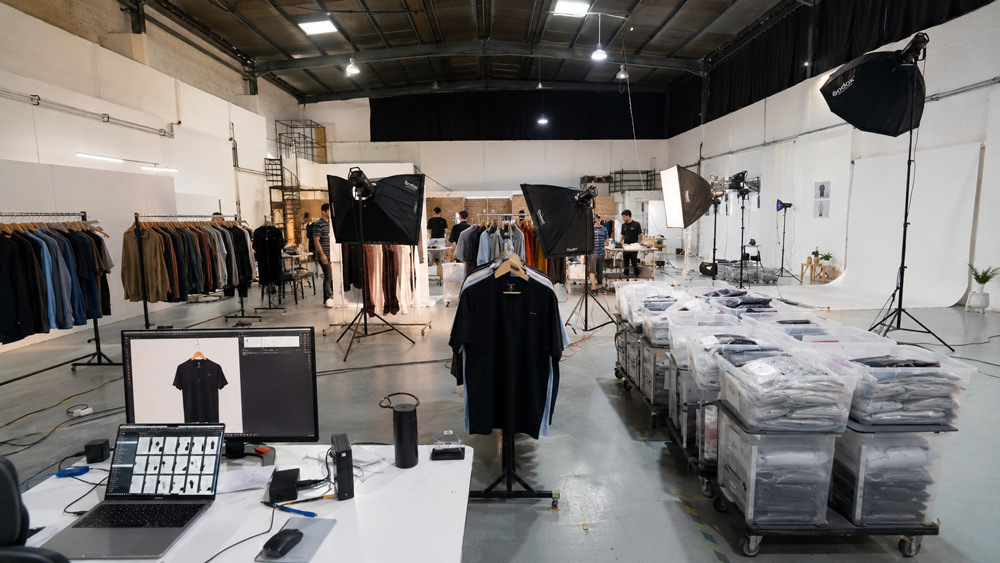
Production is where the SOP meets reality. On a Ckstudio catalog floor, every capture station runs a locked lighting setup, a tethered camera, and a producer-monitored ingest workflow. Cameras stream directly into Capture One or Lightroom, so the producer sees each frame as it is shot and can flag drift within seconds — not hours later at retouch. This is a foundational shift from behind-the-scenes reality of product photography in most freelance setups, where errors are only spotted after the shoot day ends.
For each SKU category, Ckstudio maintains a photographed lighting diagram — a top-down and front-view sketch marking the exact position, height, angle, modifier, power ratio and distance of every light. When a new shoot day starts, or when a fresh photographer rotates in, the diagram is rebuilt like a blueprint. This eliminates the single biggest source of drift in bulk ecommerce photography — that quiet 30-minute lighting adjustment nobody logged.
Camera position matters as much as lighting. Ckstudio’s framing standards fix the focal length per category (typically 50mm for general product, 100mm macro for jewellery, 85mm for apparel on stand), the camera height, and the crop ratio. Tripods are marked on the floor with tape. Focal length is locked on the lens with a small piece of gaffer tape. This is unglamorous, but it is why an SKU shot in Week 1 sits pixel-comparably next to an SKU shot in Week 4.
Colour accuracy is where premium catalogs are made or broken. Ckstudio shoots a ColorChecker frame at the start of every batch and every lighting change, and every retouch workstation runs on a hardware-calibrated monitor. This turns colour into an objective, correctable value instead of a subjective judgement. It is especially critical for jewellery, beauty and apparel — the exact categories where returns spike when the delivered colour doesn’t match the listing colour. Our real photography versus AI-generated product images analysis shows why calibrated real photography still wins on trust and colour truth.
Post-production is where scale either delivers savings or destroys them. Ckstudio’s post-production runs on master PSD templates — pre-built Photoshop files with clipping path structure, colour correction layers, shadow layers and export slices already in place. A retoucher opens the master, drops the RAW file in, runs the batch action, and delivers. This is how our image editing services team can turn around 300–500 finished images per day per retoucher without quality drift.
Recorded Photoshop actions handle the repeatable steps: background clean-up, shadow generation, colour correction, sharpening and marketplace-spec export. Each brand gets its own action set, tested against the reference board. Retouchers then focus their attention on the SKU-specific judgement calls — a stray thread, a rogue reflection — instead of repeating the same 40 clicks on every file.
File naming is the unglamorous plumbing of a large catalog — and the single fastest way to lose a shoot’s worth of work. Ckstudio locks the naming convention in pre-production: usually brand_sku_angle_variant.ext. Every ingested RAW carries the SKU from the shot list, and every export inherits it. The finished catalog lands in a DAM (or a structured shared drive) organised by category and SKU, so the brand’s ecommerce team can bulk-upload without any renaming step — the difference between a smooth Myntra ingest and a two-week rename nightmare.
A bulk shoot lives or dies on its team structure and its production calendar. Ckstudio’s standard team for a 500–1000 SKU brief includes a producer, a lead photographer, an assistant, a stylist, an ingest operator and 2–3 retouchers running in parallel with capture. The producer owns the timeline and QC gates; the photographer owns the frame; the stylist owns the SKU; the ingest operator owns file integrity; retouchers own delivery. This split ensures no single role can become a bottleneck — a lesson we learned scaling from our early top product photographers in Delhi engagements into fully industrialised bulk operations.
The throughput math is straightforward once the SOP is in place. Two capture stations, each hitting 8–10 SKUs per hour on standard on-white apparel, deliver 250–300 SKUs per shoot day. Five shoot days a week yields the 1200-SKU headline number, though realistic ecommerce catalog throughput sits around 800–1000 finished SKUs per week after ingest, QC and retouch parallelisation. Ghost mannequin, jewellery macro and on-model bring that number down; simple accessories bring it up. Our ghost mannequin photography team, for instance, has separate throughput benchmarks documented in the ghost mannequin photography for ecommerce guide.
Ckstudio runs three QC gates, and no image reaches the client without passing all three. Gate 1 is the shooter check — a real-time review of each frame against the reference board on the tethered monitor before the SKU leaves the capture station. Gate 2 is the producer check at end of day — a batch review of every SKU shot that day against the master reference, with reshoots scheduled for the same week. Gate 3 is the pre-delivery check by a QC lead — a full sweep of every finished, retouched image against marketplace specs and the brand style guide. This is the invisible layer that turns raw shoots into reliable e commerce photography output.
No two categories shoot the same way, and any Ecommerce Catalog Photography operation that tries to shoot everything with the same setup is either compromising quality or drastically slowing throughput. Ckstudio maintains category-specific playbooks for apparel, jewellery, beauty, FMCG, footwear, furniture and industrial. Each playbook adjusts lighting, focal length, styling and QC rules to the physics of the category — because a diamond stud and a saree simply do not want the same light.
Apparel at scale usually splits into three tracks: flat lay, ghost mannequin and on-model. Ghost mannequin is the workhorse of ecommerce apparel — invisible-mannequin frames that show shape without a human, at a fraction of on-model cost. Ckstudio’s garment photoshoot pipeline can hit 80–120 ghost mannequin SKUs per shoot day when the SOP is dialled in. For brands mixing on-model with ghost, our model photoshoot in Delhi team runs a parallel track so the two never bottleneck each other.
Jewellery is the hardest category to keep consistent at scale, because tiny variations in lighting angle blow up into visible reflection differences on chrome, gold or diamond surfaces. Ckstudio’s jewellery photography pipeline uses focus stacking on macro rigs, tent lighting for uniformity, and a very tight framing standard. Even the tweezers holding the pieces are the same tweezers across the entire shoot. When brands ask us how their catalog can look like a Cartier grid instead of an Etsy grid, the answer is almost always this: discipline, not equipment.
Home, kitchen, beauty and FMCG catalogs each have their own quirks — beauty demands reflection control on glossy packaging, kitchen products often need scale references, FMCG needs pin-sharp label legibility for platform search. Ckstudio’s beauty and cosmetic photography, kitchen product photography and FMCG photography pipelines are each documented separately, so a producer can predict throughput and cost with high accuracy before quoting.
Bulk pricing in Ecommerce Catalog Photography looks confusing on the surface because vendors quote in three different units: per-image, per-SKU and per-package. Ckstudio’s approach is transparent — we quote per-SKU for standardised categories (apparel, accessories, jewellery, FMCG) and per-package for enterprise engagements with custom scope. Volume tiers kick in above 100 SKUs and again above 500, with the largest per-image savings landing above 2000 SKUs where our master PSDs and batch actions really pay off. If you want a wider view on pricing, the ecommerce photography pricing guide 2026 and our product photography cost in Delhi breakdown are worth reading alongside.
| Plan | SKU Volume | Includes | Turnaround | Starting Price |
|---|---|---|---|---|
| Starter Catalog | Up to 100 SKUs | On-white shots, basic retouching, JPG delivery | 5–7 days | Rs 300/image onwards |
| Growth Catalog | 100–500 SKUs | On-white + on-model or ghost mannequin, standardised retouching, multi-marketplace exports | 10–14 days | Rs 250/image onwards |
| Enterprise Catalog | 500–2000 SKUs | Dedicated producer, locked lighting, master PSDs, DAM handoff, 3-layer QC | 3–4 weeks | Rs 180/image onwards |
| Marketplace-Ready Bulk | 2000+ SKUs | Fully managed production, on-site producer, weekly delivery cycles, DAM integration, custom SLAs | Custom | Custom (request quote) |
Indicative pricing for standard on-white apparel and accessories categories. Ghost mannequin, jewellery macro, on-model and 360° add per-SKU premiums. For a precise quote, WhatsApp Ckstudio on +91-8700258773 or email [email protected].
Per-image pricing is honest for simple briefs but punishes multi-angle catalogs — a jewellery piece with six angles quietly becomes six times the quoted number. Per-SKU pricing is fairer for multi-angle catalogs because it bundles the standard angle set into one number. Package pricing is best for enterprise briefs above 2000 SKUs where scope, timeline and delivery SLAs become the more important negotiation levers than per-unit cost. Ckstudio recommends per-SKU for most bulk briefs and package for enterprise — the same recommendation we make in our product photography guide for Indian brands.
The single fastest way to lower cost per image is volume — pushing your catalog into the next tier bracket by combining categories or bundling quarterly refreshes. The second is standardisation: fewer angles, fewer prop variations, fewer on-model looks. The third is batch scheduling: instead of running four small monthly shoots, run one large quarterly shoot. Ckstudio’s producers routinely help brands restructure their catalog plan to drop 20–30% off per-image cost without touching quality, using the same principles we cover in our product photography tips for ecommerce sales resource.
Delivery is often the neglected step in Ecommerce Catalog Photography — but it is where most bulk projects lose a week to friction. Ckstudio’s delivery workflow is engineered to remove that friction entirely. Every catalog exports in parallel to every marketplace preset the brand needs, gets bundled into a structured folder tree, and lands in either a shared DAM, Google Drive, or a WeTransfer package depending on scale. For enterprise engagements, we can integrate directly with the brand’s PIM or DAM via API.
Different marketplaces want different specs — Amazon India prefers pure white JPGs at 1600px+, Shopify accepts WebP for site speed, Myntra requires specific pixel dimensions per template. Ckstudio’s export layer runs pre-built presets for each destination, so a single retouched master fans out into 4–6 platform-ready variants in a single batch action. It is the same discipline that underpins our Myntra product photography and Amazon pipelines.
Small brands prefer Google Drive folders keyed by category. Mid-size brands prefer WeTransfer packages per shoot day. Enterprise brands prefer DAM integration with automated ingest and metadata tagging. Ckstudio supports all three. For enterprise engagements we can push assets directly into a brand’s WebP-optimised pipeline or DAM via API, so the ecommerce team never has to touch a download link. The handoff step should be invisible — if it is not, something in the SOP has drifted.
Ckstudio has photographed 50,000+ products for 500+ brands over Prince’s 9+ years leading the studio — and the majority of that volume has been bulk Ecommerce Catalog Photography, not one-off hero shots. The team’s operational depth, documented SOPs, category-specific playbooks and Delhi NCR studio infrastructure make us the go-to catalog partner for D2C brands scaling from 100 to 10,000 SKUs. When founders and catalog managers first tour our floor, the reaction is almost always the same: “This looks like a factory, not a studio.” That is exactly the point.
Beyond process, what brands consistently tell us they value is accountability. Every project has a named producer, a defined SLA, and a single point of escalation to Prince himself when things need to move faster. Whether a brand is exploring how to choose the best product photography studio or comparing us against options in the Mumbai catalog market, the Ckstudio pitch stays the same: shot-list-driven, SOP-locked, QC-gated, on time and on brand. Call Prince on +91-8700258773 to walk through your catalog.
Book a 20-minute consultation with a Ckstudio catalog producer. We will walk through your SKU volume, category mix, marketplace targets and give you a per-SKU quote in the same call.
For anyone curious about the gear behind a Ckstudio catalog day: our shoot floors run Sony A7R5 and Canon R10 bodies for stills, tethered into Capture One via USB-C. Lighting is built on Godox SK 400II and Elinchrom FRX 400 heads with strip softboxes and octaboxes for soft even light, and a beauty dish on the fashion side. For jewellery macro we run 100mm macro lenses on rails with focus stacking. For colour we rely on X-Rite ColorChecker Passport and hardware-calibrated retouch monitors. Everything on this list is chosen for repeatability, not novelty — the same reason we choose the same tools every shoot.
The five most common mistakes we see when brands manage their own bulk catalog shoots: skipping the reference board, allowing photographer rotation without SOP handoff, letting retouchers work without master PSDs, quoting per-image on a multi-angle catalog, and delivering assets without marketplace-specific export presets. Each of these looks minor in isolation and catastrophic at scale. Ckstudio’s playbook exists to prevent every single one — often in the first 20 minutes of a discovery call.
AI is starting to touch every layer of Ecommerce Catalog Photography — background removal is nearly solved, colour matching is getting better, and generative fills for shadow reconstruction are showing real promise. Ckstudio integrates these tools where they save time without hurting quality. What AI cannot yet do well is judgement — deciding whether a jewellery reflection is intentional or a distraction, whether a garment drape reads premium or cheap, whether a beauty product’s texture is honestly represented. That judgement is still human, and it will remain the differentiator between a catalog that ranks and a catalog that gets rejected. This is a subject we treat in depth in our comparison of AI ecommerce photography vs professional.
Ecommerce Catalog Photography is the process of shooting large volumes of product images — typically 100+ SKUs — with standardised lighting, framing, colour and retouching, so every product on your ecommerce site or marketplace listing looks visually consistent and conversion-ready.
Ckstudio uses a locked SOP: pre-approved shot lists, fixed lighting diagrams, tethered shooting with ColorChecker calibration, master PSD templates for retouching, and a 3-layer QC process — ensuring every SKU matches the reference frame regardless of shoot day.
Bulk catalog photography in India typically ranges from Rs 150 to Rs 800 per image depending on category (on-white vs on-model vs jewellery macro), volume discount, retouching complexity and turnaround. Ckstudio offers tiered plans starting from Starter Catalog to fully managed Enterprise packages.
A 1000-SKU catalog with Ckstudio’s SOP workflow is typically delivered in 3–4 weeks, including pre-production, shoot days, batch retouching, QC and marketplace-ready exports.
Yes. Every Ckstudio catalog shoot includes export presets pre-configured for Amazon India, Flipkart, Myntra, Ajio, Nykaa, Meesho and Shopify — ensuring first-pass approval and zero reshoot cycles.
Ckstudio has shot 50,000+ products for 500+ brands across India — and every catalog was delivered on time, on brand and marketplace-ready. Bring us your next 500, 1000 or 10,000 SKUs and we will run them through the same locked SOP that keeps everything looking like it was shot by the same eye on the same day.