

Fashion Photography Services

E-commerce Photography
What the From the brand carousel needs, which sizes to confirm inside A+ Content Manager, and how to shoot every card so it passes review the first time.
An Amazon brand story is the horizontal From the brand carousel that sits on a product detail page and tells shoppers who is behind the product, what the range looks like and where to see more of it. This guide is part of the Amazon seller hub, and it covers one job only: getting your Brand Story images right, from module choice to the last approval check.
At Ckstudio we have shot marketplace catalogues since 2015, and Brand Story is the module where we see brand-registered sellers lose the most time. The images are wide, the crops change between desktop and mobile, and many sellers copy size figures from blogs that never link to Amazon. Below, Prince explains what to verify, what to shoot and how to plan the carousel so it supports your A+ content instead of repeating it.
In this guide
Amazon Brand Story is a brand-level carousel shown under the From the brand heading on a detail page, while A+ content is product-level and explains one product or variation family. Brand Story introduces the company and the range; A+ sells the specific item below it.
Think of the detail page as two layers. The upper layer, the image gallery and bullets, answers what is this product. A+ content further down answers why this product is better. The Amazon brand story answers a third question that both layers skip: who makes this, and what else do they sell? Amazon’s own A+ Content explainer on Amazon.in describes rich text and images as a way for brands to present their story and product features, and Brand Story is the part of that toolkit dedicated to the story half.
Because one Brand Story can be applied across many ASINs, it behaves like a mini brand store that travels with every listing. A shopper who lands on a single face serum can swipe sideways and see your cleanser, your sunscreen and your founder note without leaving the page. That is why the images must be planned as a sequence. If the carousel images are weak crops of gallery photos, sellers usually need fresh Amazon product photography planned around the module shapes rather than the square gallery frame.
| Point | Brand Story | A+ content |
|---|---|---|
| Scope | Brand and range | One product or variation family |
| Position on page | From the brand carousel | Product description area |
| Image shape | Wide hero plus small cards | Module-specific banners and tiles |
| Main goal | Trust and cross-selling | Feature proof and conversion |
| Reuse | Same story on many ASINs | Usually written per product |
If you have not built product-level modules yet, our A+ content guide covers that layer. Keep the two separate in your plan: a Brand Story that repeats A+ banners wastes the one module shoppers use to explore the rest of your catalogue.
Brand Story is available to brand owners enrolled in Amazon Brand Registry, and it appears inside A+ Content Manager only for ASINs that carry the registered brand name. If the option is missing, the cause is almost always enrolment, brand-name mismatch or the wrong login.
Brand Registry is the gate. Amazon’s Brand Registry programme for India asks for an active or pending registered trademark that matches your brand name, and Amazon verifies ownership by sending a code to the trademark contact. Once you are enrolled, the brand tools open up: A+ content, the Brand Store, Sponsored Brands and the Amazon brand story carousel.
Sellers on the Amazon.in forums regularly report that they are registered but cannot see Brand Story. The fixes that come up most often are practical:
Have three things ready before anyone opens A+ Content Manager. First, the trademark certificate or application number, because every later dispute traces back to it. Second, a clean logo file: a transparent PNG of the wordmark plus a version on a solid background, both at a generous size. Third, a list of the ASINs and product lines you want the carousel to promote, grouped by category, because that list decides how many product cards you need to shoot.
If you sell under more than one registered brand, plan one Amazon brand story per brand. Mixing brands in one carousel confuses shoppers and makes the logo card meaningless. For sellers who also list on Flipkart or Myntra, note that those marketplaces have their own brand page formats, so the wide Amazon assets usually need a separate crop rather than a direct reuse.
A short internal check saves days later: open one live ASIN, confirm the brand name shown under the title matches your trademark, and confirm the Visit the Store link appears. If both are present, Brand Registry is working and the Brand Story option should be available for that listing.
The carousel opens with a background hero card that carries your logo and a short description, followed by smaller cards for focus images, product ASINs, the Brand Store and questions shoppers ask. Order them from story to products to proof, so a swipe feels like a guided tour.
Amazon’s developer documentation for the A+ API states that every Brand Story document starts with exactly one background image module that includes the logo, which confirms that the hero card is mandatory and comes first. After that, the card types sellers use most often are listed below. Names in your account may differ slightly, so match them against the live module picker.
| Card type | What it shows | Image you need | Best placement |
|---|---|---|---|
| Background hero with logo | Brand mood, logo, one-line description | Wide lifestyle scene with empty space for the logo card | Always first |
| Focus image card | Founder note, ingredient source, craft process | Portrait-shaped lifestyle or detail photo | Second or third |
| ASIN showcase | Several products with links | Clean, consistent product cut-outs | Middle |
| Store showcase | Links into Brand Store pages | Category tiles, one per store page | After products |
| Questions and answers | Short answers to common doubts | Optional supporting image | Last |
Every module after the hero should add something new. A carousel where four cards show the same bottle from slightly different angles tells the shopper nothing they did not already learn in the gallery, and it usually signals that nobody planned the Amazon brand story before the shoot.
Confirm every Amazon Brand Story size inside A+ Content Manager, because the upload dialog shows the current minimum for each card. The figures quoted widely online are a useful starting point for planning a shoot, but most of them come from third-party blogs, not from an Amazon page you can cite.
The Ckstudio team checked what is published. The figures below repeat across many seller blogs, and one of them claims they come from Amazon’s developer documentation. We could not open an Amazon page confirming them, so treat the column on the right seriously. A larger 3000 x 600 hero figure also circulates in 2026 articles with no Amazon source at all; do not build a shoot around it until your own upload dialog shows it.
| Card | Commonly reported minimum | Source status |
|---|---|---|
| Background hero, desktop | 1464 x 625 px | Third-party, unverified |
| Background hero, mobile crop | 463 x 625 px | Third-party, unverified |
| Logo card | 315 x 145 px | Third-party, unverified |
| Focus image card | 362 x 453 px | Third-party, unverified |
| ASIN and store tiles | 166 x 182 px | Third-party, unverified |
| Hero at 3000 x 600 px | Claimed in some 2026 articles | No Amazon source found |
What does that mean for the shoot? Two things matter more than the exact pixel count. The first is aspect ratio: the hero is very wide on desktop and closer to portrait on mobile, so the subject must survive both crops. The second is headroom: shooting at full camera resolution leaves room to export any size Amazon asks for later.
From the studio floor
For a Brand Story hero we shoot at the full 61 MP of the Sony A7R5 with a 50mm lens at f/8, framing roughly twice as wide as the final crop. The product group sits in the left 40% of the frame, so the logo card has clean space on the right, and a second frame is taken with the group centred for the mobile crop. Files are delivered as sRGB JPEGs, with the layered PSD kept for re-exports.
Export each card from the master file at the size the upload dialog requests, or a clean multiple of it if your account accepts larger files at the same ratio. Keep files in sRGB, because Adobe RGB files look washed out once a browser displays them. Sharpen after resizing, not before, and check the logo edge at 100% zoom: soft or haloed logo edges are the most visible sign of a lazy export.
If your existing photos are close but the crops do not work, careful image editing and retouching can extend backgrounds, clean edges and rebuild safe space around the subject before you resort to a reshoot.
Plan four asset groups before the shoot day: one wide hero scene, two or three lifestyle or process images for focus cards, a clean logo file, and a matching set of product cut-outs. Shooting them in one session under one lighting scheme is what makes the carousel look like one brand.
Most weak carousels come from photos taken at different times for different jobs. The hero is a festive campaign image, the product tiles come from three supplier shoots, and the focus card is a phone photo of the factory. Each one may be fine alone; together they look like a marketplace reseller, not a brand. A planned Amazon brand story shoot fixes that by locking the colour palette, light direction and surface before the first frame.
The hero is a wide environment, not a product shot. Build a set with depth: a long surface, a soft background, two or three props that suggest how and where the product is used. Keep the range left of centre, because the logo card overlaps one side. A brand that needs the hero set styled and lit properly usually benefits from dedicated lifestyle product photography, since the brief is closer to a campaign image than to a white-background listing photo.

Focus cards are portrait-shaped, so shoot them vertically on purpose instead of cropping a landscape frame. Good subjects are hands using the product, a raw ingredient, packing at your unit, or the founder at work. Each card should answer one doubt: is this safe, is this handmade, is this worth the price?
The logo card needs a vector or high-resolution PNG, never a screenshot. Product tiles need identical framing: the same camera height, the same fill and the same shadow on every SKU, so the ASIN row looks like one family. Our 7-photo listing sequence explains how those cut-outs also feed the gallery.
From the studio floor
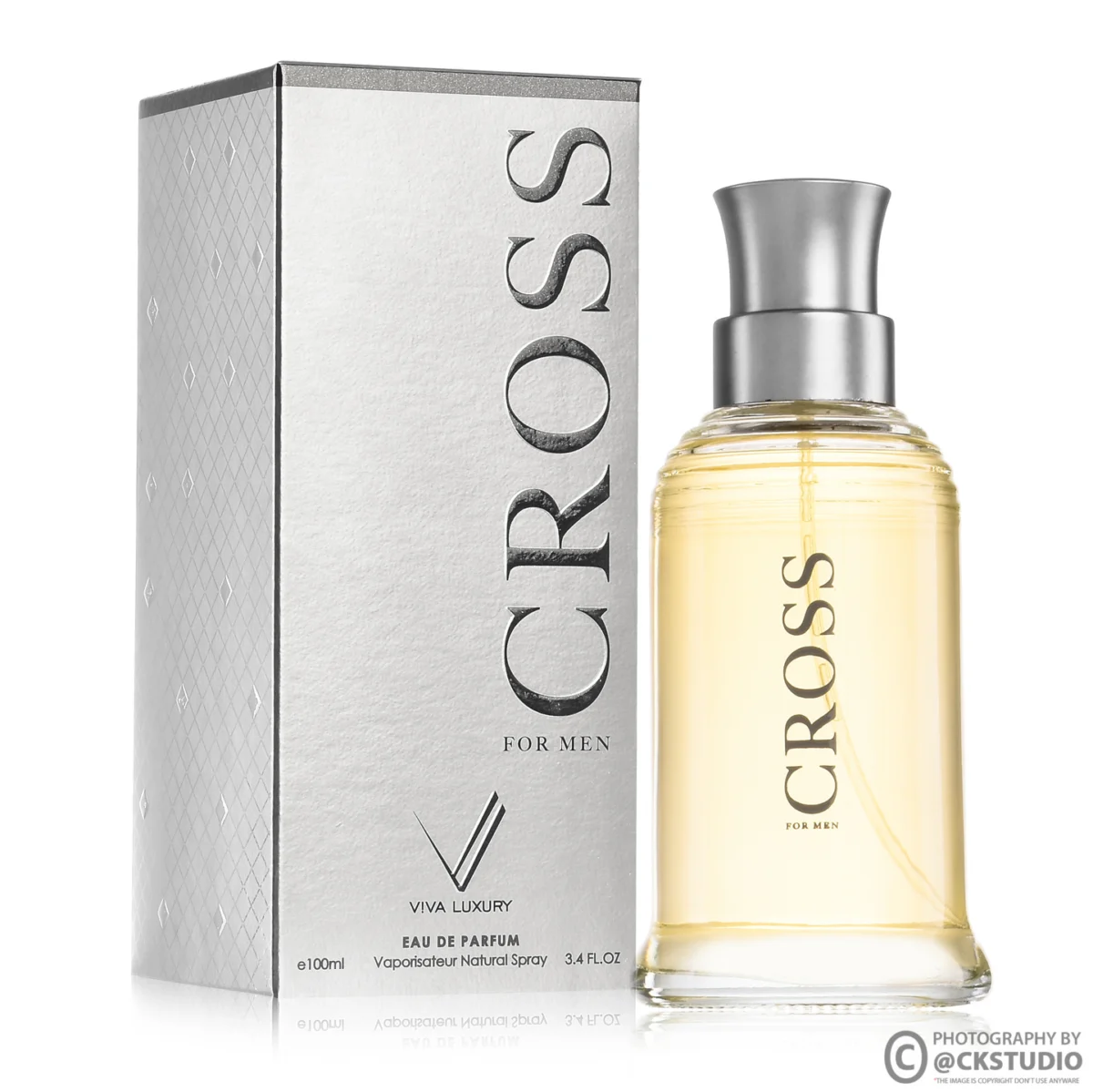
For product tiles we fix the camera on a tripod at the product’s mid-height, use a 100mm macro for small items and a 50mm for larger ones, and keep one octabox at 45 degrees left with a white bounce on the right for every SKU. A taped floor mark and a saved capture template in the tether software keep fill and position identical, so a dozen products photographed across a day still line up in one row.
This BTS cosmetic shoot shows the kind of controlled tabletop setup that produces matching product tiles and hero frames in a single session.
Open A+ Content Manager in Seller Central, choose the Brand Story option, add the hero card first, then the supporting cards, apply the story to your ASINs and submit it for review. Preview both the desktop and mobile versions before you submit.
The exact menu labels change from time to time, but Amazon staff replies on the Amazon.in seller forum describe the same sequence, and it matches what the Ckstudio team sees when preparing assets with brand teams. Work through it with all final images exported and named before you start, because the builder times out and half-built drafts are easy to lose.

Why preview on a phone? A large share of Indian marketplace traffic is mobile, and the mobile hero crop is much narrower than desktop. A hero that looks balanced on a laptop can lose half the product group on a phone, which is why the studio shoots a separate centred frame.
This marketplace BTS shoot shows how a small product is lit and framed for Amazon, Flipkart and Myntra listings, the same discipline the carousel cards need.
Give one person final sign-off. When the photographer, the designer and the catalogue executive each edit the draft, the hero gets replaced, the order changes and nobody remembers which version was approved. A single owner with a short checklist keeps the story consistent across every ASIN it is applied to.
Most rejections come from content rules rather than image size: claims Amazon cannot verify, pricing or promotional language, references to competitors, contact details, or low-quality and stretched images. Fix the content first, then re-export the images cleanly.
A+ content and Brand Story are reviewed against the same family of content guidelines. Amazon publishes the exact list inside A+ Content Manager, and it is worth reading once with the team. The rejection reasons sellers report most often map to a short set of fixes.
| Common mistake | Why it gets flagged | Fix |
|---|---|---|
| Best-seller or number one claims | Unverifiable superlatives | Describe what the product does instead |
| Prices, discounts, sale badges | Promotional content not allowed | Remove all price and offer text from images |
| Phone, email or website in an image | Off-Amazon contact details | Keep only the logo and brand name |
| Stretched or blurry hero | Low-quality image | Re-export from the master at the right ratio |
| Text baked into the background | Unreadable on mobile, may be flagged | Use the card’s text fields for words |
| Medical or guaranteed-result claims | Restricted claims | Use cautious, factual wording |

From the studio floor
Before any Brand Story file leaves the studio, the Ckstudio QC pass checks four things at 100% zoom: logo edges, dust on glossy packaging, label legibility on the hero SKU and colour against the physical product under a 5000K viewing lamp. A second check views the whole carousel at phone width, roughly 375 px, because that is where cropped products and tiny text show up first.
If a submission is rejected, read the reason carefully, change only what it mentions, and resubmit. Rewriting the whole carousel after a single text flag only creates new review risk.
Use an 8-point checklist that covers eligibility, layout, sizes, the hero crop, product consistency, logo quality, content rules and the mobile preview. If every point passes, the carousel is ready to submit and unlikely to come back for rework.
Print this list or keep it in your catalogue tracker. It is the same order we follow when preparing assets for a brand-registered seller, and it turns a vague creative brief into checks anyone in the team can tick.
Example scenario
Example: a skincare brand with 12 SKUs in three lines plans its Amazon brand story. The shoot list has 1 hero scene in two crops, 3 portrait focus images (ingredient, hands applying, packing table), 12 product cut-outs on white and 3 category tiles for the store card, so 20 final files in total. Shot in one day under one lighting setup, the carousel goes out as one draft applied to all 12 ASINs. These numbers are illustrative, not a client result.
Ckstudio builds this kind of shoot list with the brand owner before the shoot day. If you want help planning the carousel, call +91-8700258773 or WhatsApp +91-8700258773 with your ASIN list, and Prince or the team will map each card to a shot.
Amazon has widened Premium A+ access for brand-registered sellers this year, and richer modules usually reward brands that already own wide, high-resolution assets. Short brand videos and interactive cards are also getting more space on e-commerce detail pages. A library of master files shot at full resolution is the safest way to stay ready for new card formats without reshooting each time.
An Amazon brand story is a horizontal carousel under the From the brand heading on a product detail page. It introduces the brand, shows its range and links to other products and the Brand Store, and one story can be applied to many ASINs.
Yes. Brand Story is a brand tool, so you need Amazon Brand Registry with an active or pending trademark, and the brand name on each ASIN must match the registered brand.
Many seller blogs quote 1464 x 625 px for desktop and 463 x 625 px for the mobile crop, but we could not confirm these on an Amazon page. Always use the size shown in your A+ Content Manager upload dialog.
No. Both are built in A+ Content Manager, but Brand Story describes the brand and range, while A+ content explains one product. Most brands use both on the same detail page.
Common reasons are prices or offers in images, contact details, unverifiable claims such as number one, competitor references and low-quality or stretched images. Fix only what the rejection reason mentions and resubmit.
Product cut-outs can be reused for ASIN tiles if they match in angle and lighting. The hero and focus cards need different shapes, wide and portrait, so they usually need a dedicated shoot.
A strong Amazon brand story is not a design exercise added at the end. It is a short, planned shoot that gives the carousel one look, one light and one message, and it pays back on every ASIN it is applied to. For a shoot plan or a review of your current carousel, email [email protected], call +91-8700258773 or message on WhatsApp.
Next step: once the carousel is planned, build the product-level modules below it with our A+ photography rules for content modules.
Send your ASIN list and logo, and Ckstudio will map every carousel card to a shot: hero, focus images and matching product tiles, delivered as master files ready for any size Amazon asks for.
Call Prince: +91-8700258773