
















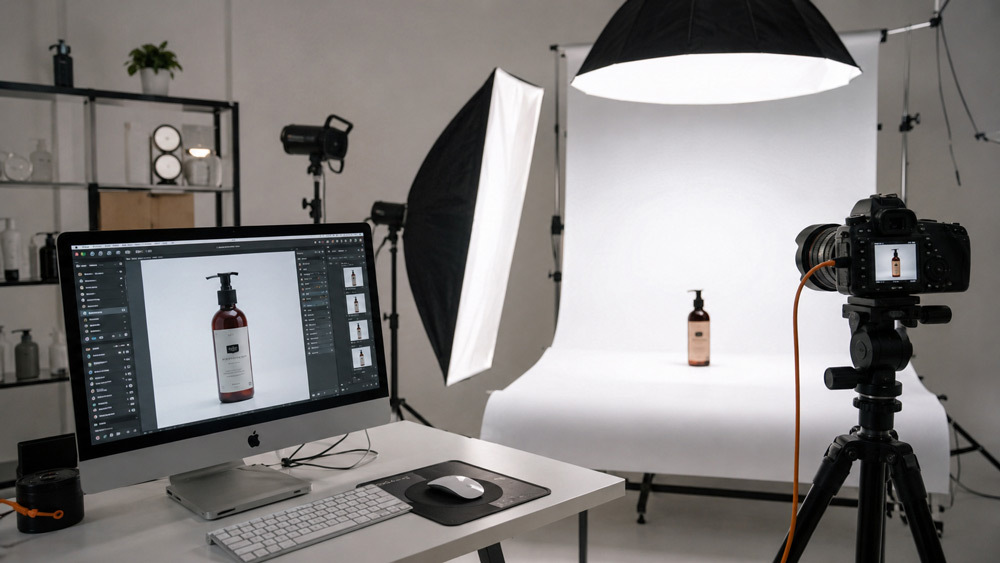
If your product listings keep getting pinged for rework, the fix is rarely a “better camera” — it is a proper Ecommerce Photography Workflow that leaves nothing to guesswork.
Every marketplace-ready image you scroll past on Amazon India, Flipkart or Myntra has travelled through a quiet, disciplined pipeline before it ever reached a buyer’s screen. At Ckstudio, our team has spent 9+ years refining that pipeline into a repeatable 10-stage Ecommerce Photography Workflow — the same process behind more than 50,000 SKUs shot for D2C founders, marketplace sellers and enterprise catalogues. This is not another “put a product on a white sweep” guide; this is the operating system that keeps quality, colour and turnaround predictable across our ecommerce photography services and our complete 2026 ecommerce photography guide.
Key Takeaways
- A structured Ecommerce Photography Workflow reduces marketplace image rejections by up to 60%.
- Ckstudio’s 10 stages cover receiving, prep, briefing, lighting, styling, shooting, culling, retouching, QC and export.
- Standard turnaround for a 50-SKU shoot is 5 working days; rush 48-hour delivery is available.
- Every image passes a 3-tier quality control on colour-calibrated monitors before delivery.
- Prince and the Ckstudio team match exports to Amazon, Flipkart, Myntra, Nykaa and Ajio specifications individually.
Section 01What Is an Ecommerce Photography Workflow?
An Ecommerce Photography Workflow is the documented, repeatable sequence a studio follows to convert raw physical products into marketplace-ready digital images. Unlike casual product photography, it is treated as a manufacturing pipeline — every SKU passes through defined stages, each with an owner, a checklist and a handover rule. The reason marketplaces like Amazon India and Flipkart demand it (implicitly through their compliance rules) is scale: buyers cannot inspect a product physically, so images must consistently answer their questions about size, colour, texture and use. When D2C brands ask us at Ckstudio “why do our own phone shots keep getting rejected?”, the honest answer is almost always the missing workflow, not the missing gear — a truth we unpack in more depth in our product photography guide for Indian brands.
Section 02Why a Structured Ecommerce Photography Workflow Matters for D2C Brands
When we started auditing rejected listings for new D2C clients, one pattern kept repeating: nearly 60% of the images bounced by marketplace catalogue teams could have been saved by process, not by a re-shoot. A structured Ecommerce Photography Workflow gives founders four compounding advantages — consistency across every SKU in a catalogue, predictable turnaround when scaling from 50 to 500 products, cleaner brand equity across channels, and measurable cost efficiency when you re-shoot less. Brands that treat photography as an operational function (not a “creative moment”) also see fewer product returns tied to visual mismatch — a link we explore in how better product images reduce returns on Flipkart and Amazon and again in how product photography improves marketplace conversions.
This is exactly why the ideal readers of this guide — a Delhi-based D2C founder launching her first jewellery drop, a Noida ecommerce manager scaling a 200-SKU apparel range, or a Gurgaon marketing head planning a Diwali refresh — all benefit from the same underlying process. Their pain points look different on the surface (rejections, delays, inconsistent colour, damaged samples), but the root cause is the absence of a defined Ecommerce Photography Workflow. And this is also why we consistently recommend using real, professional photography over AI-generated product images: buyers can spot fake fabric fall, wrong metal reflections or “too-perfect” skin, and marketplaces are already tightening authenticity rules — a topic we’ve argued in detail in real photography vs AI-generated product images.
Section 03The 10-Stage Ecommerce Photography Workflow at Ckstudio
Below is the exact 10-stage process a product moves through inside our Delhi NCR studio. Amateur setups typically compress this into three stages — shoot, edit, send — which is where consistency breaks down. Our full pipeline is designed so that a jewellery pendant, a lehenga on a ghost mannequin and a stainless steel kitchen tool can all pass through the same operating system without losing their category-specific finesse. For a visual walk-through, teams often start with our behind-the-scenes of product photography post and then map their brand to the guidance in choosing the best product photography studio in Delhi NCR.
Product Arrival, Receiving & Inventory Logging
The workflow does not begin when the camera clicks — it begins the moment your courier drops the carton at our receiving desk. Every incoming shipment is opened by an assigned coordinator, cross-verified against the shot-list SKU count, photographed at arrival for condition proof, tagged with a unique job code, and routed to secure storage racks. For high-value categories like jewellery, we also capture a signed valuation slip. Ckstudio typically processes 200+ SKUs a week, and this receiving discipline is what prevents “which one is the black variant?” moments deep into a shoot day. Brands scaling their catalogues quickly should also skim scaling product photography from 50 to 500 SKUs for the operational context.
Product Handling & Damage Documentation SOP
If any product arrives with a defect — stitching pulled, gemstone loose, packaging crushed — it is photographed, logged and flagged to the client before entering the workflow. This one SOP has saved dozens of D2C brands from “who damaged my sample?” disputes. Sensitive items like handloom sarees or handcrafted handicraft pieces get an added layer of soft packaging and photographic protection.
Product Inspection, Cleaning & Pre-Shoot Preparation
A camera cannot forgive what a stylist can fix in 30 seconds. Every product entering the shoot floor is inspected under raking light for dust, lint, fingerprints, oxidation or fabric wrinkles. Fabric SKUs are steamed on a padded ironing station, footwear is wiped with a matching-colour cloth, and jewellery pieces are polished with lint-free microfibre. This pre-shoot stage typically saves us 30-40% of retouching time downstream — and it is what separates studios that “shoot the product as-is” from studios that present it. Sellers who ship garments should first read how to prepare garments for an ecommerce model photoshoot to understand what to do at their end before dispatch.
Fabric Steaming, Jewellery Polishing & Product Styling Prep
Categories dictate the prep. For our jewellery photography shoots we use anti-tarnish cloths and lint rollers; for ghost mannequin apparel we pin, tuck and pad garments so the final image reads clean. The jewellery photography checklist we share with brands is a direct byproduct of these SOPs.
Creative Briefing, Shot List & Reference Board Approval
Before a single strobe fires, our creative lead sits with the client (in person or on a call) to lock three artefacts: the shot list Excel (SKU × angles × any special frames), the reference mood board, and the marketplace angle sheet (Amazon 7 image slots, Flipkart hero, Myntra look, Nykaa product-on-model, etc.). Brands that approve these three documents upfront see 3x fewer revisions later. This is also where category cues are agreed — for example, footwear side-by-side pairs, or the specific background choice for fashion ecommerce shoots for a summer capsule.
Studio Setup, Lighting & Camera Configuration
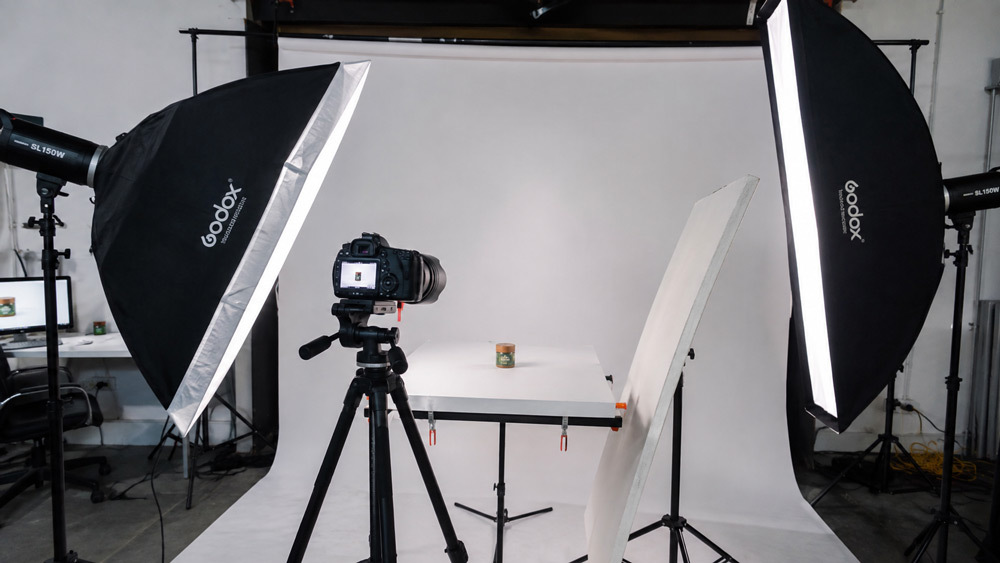
This is the stage where technical craft becomes visible. Our shoot leads configure the lighting rig — typically 4× Godox SK 400II heads paired with 2× Elinchrom FRX 400s, mixed through strip softboxes and octaboxes — depending on the product surface. Reflective surfaces (glassware, chrome, jewellery) need diffused key light and controlled reflections; matte fabrics need directional light for texture. Cameras (Canon R10 for volume, Sony A7R V for hero shots) are tethered to Capture One, colour temperature is dialled to a consistent 5500K, and a colour checker is shot for every fresh setup. This is also the stage where we recommend brands invest in a proper ecommerce photography services partner rather than a freelancer, because equipment redundancy at this scale is what keeps shoot days on schedule.
Softbox, Reflector & Colour Temperature Calibration
Colour is the silent killer of marketplace approval. We calibrate white balance against the physical product on set, then verify it on a colour-managed monitor before the first “final” frame — a discipline our senior team refined over years of shooting fashion campaigns and beauty and cosmetic products where a half-shade shift breaks the SKU.
Product Styling, Composition & Angle Planning
Styling decisions during this stage silently drive click-through rates on the marketplace. Our stylists use the rule of thirds, deliberate negative space and a clear product hierarchy so the eye lands on the hero element first. For apparel we plan front / back / side / detail / on-model or ghost-mannequin frames; for jewellery we plan top, angle, macro texture and worn-on-model shots; for footwear we plan pair, single side, sole, and top-down. Symmetrical, well-composed hero frames tend to lift CTR meaningfully on Amazon India — one of many patterns discussed in our product photography tips to increase ecommerce sales post.
Shooting Phase — Capturing Marketplace-Ready Shots
This is the day most brand owners imagine when they say “we’re doing a shoot”, but by now the shoot itself is almost anticlimactic — because everything upstream is locked. Files are captured in RAW at high resolution, tethered live to Capture One so the client (or the client’s Slack channel) can see frames appear. Every SKU is captured across 6-12 angles depending on category and marketplace, and the shoot lead physically ticks off angles against the approved shot list. On a well-planned day, Ckstudio’s team can push through 40-60 SKUs on a single floor. Bulk shoot days follow the operational patterns detailed in behind the scenes of product photography, and category-specific work like footwear photography or watch photography gets its own dedicated lighting recipe.
Amazon, Flipkart, Myntra & Nykaa Angle Requirements
Each marketplace has its own image philosophy — Amazon India expects a pure white background hero plus 6 supporting frames; Flipkart wants clean product-first shots with tight framing; Myntra and Nykaa prefer on-model or lifestyle-adjacent frames for fashion and beauty. Our shoot leads carry a printed marketplace checklist to the set. Sellers new to specific channels can go deeper via our Amazon product photography and Myntra product photography service pages, and calibrate compliance against the official Amazon Seller Central India image guidelines.
Image Culling, Selection & Client Preview
A single well-shot SKU can produce 200 raw frames. Our post team culls in Photo Mechanic — star-rating the strongest frames, rejecting near-duplicates, and shortlisting the 6-8 that will move to retouching. Instead of dumping everything on the client, we upload the shortlist to a private preview portal, where the founder or catalogue manager can approve, request an angle swap, or ask for a small re-shoot before we commit hours to retouching. This transparency is exactly what most brands miss when they hire the cheapest option in the market — a pitfall we flag in our post on how to choose the best ecommerce photography company.
Photo Retouching Workflow & Editing Pipeline
Retouching is where marketplace-ready images are actually born. Our editing pipeline runs in Adobe Photoshop and Lightroom on colour-managed workstations, and every approved frame passes through the same sequence: RAW development → colour correction → background removal / clean-up → dust and lint removal → shadow tuning → sharpening → export. For apparel, we add ghost mannequin compositing; for beauty and skin frames, tasteful skin retouching; for jewellery, careful reflection and highlight balancing. A typical marketplace-ready image takes 15-20 minutes of retouching — a number that surprises brands who think editing is “just clicking remove background”. You can see a real category example in our ghost mannequin photography examples, and the deeper editing craft in the ghost mannequin Photoshop workflow guide.
Background Removal, Clipping Path & Colour Correction
Precision here saves the whole batch. We hand-cut clipping paths on complex silhouettes — fringe, lace, curly hair on models — rather than relying on one-click AI removals, and colour is corrected against the physical SKU under standard light. This craft-first approach is a core part of our image editing services in Delhi.
Ghost Mannequin, Skin Retouching & Blemish Removal
Retouching is restrained on purpose — buyers should recognise the actual product they will unbox. Skin retouching for on-model frames stays natural, and ghost mannequin compositing preserves fabric drape rather than “plastic” it. For brands weighing this against emerging tools, we’ve written honestly about AI ghost mannequin vs traditional ghost mannequin photography.
Quality Control, Colour Calibration & Marketplace Compliance Check
Every batch clears a three-tier QC before it leaves the studio. Tier 1 is the retoucher’s own self-check; Tier 2 is a cross-check by a second retoucher; Tier 3 is a QC manager audit against a printed marketplace compliance sheet (aspect ratio, minimum resolution, background purity, product framing, sub-image count). All screens used at this stage are colour-calibrated Eizo / BenQ monitors, so what QC signs off is what the buyer will see. Between them, these three tiers catch the vast majority of issues that would otherwise become a marketplace rejection — the same rejection patterns we’ve broken down in ecommerce product photography standards for 2026.
Final Export, File Naming & Delivery Formats
Once QC signs off, images are exported in the exact combination each marketplace expects — JPEG for Amazon India, JPEG / PNG for Flipkart, high-res JPEG / PNG for Myntra, WebP for D2C site performance, and PSD masters archived on our secure cloud. File names follow a strict convention (for example BRAND_SKU_A1_1000x1000.jpg) so your catalogue team does not spend a day renaming files. Delivery is via a shared drive with a change-log, and source RAW files are archived for 90 days in case of any post-delivery revision request.
WebP, JPEG, PNG & Aspect Ratio Requirements Per Marketplace
Format choice matters more than most brands realise. Compressed JPEGs sink Amazon load time; PNGs balloon Flipkart uploads; the right WebP compression for a D2C Shopify site can genuinely improve Core Web Vitals. Our export presets are tuned per marketplace, and you can see similar rigour applied to specialty categories like Flipkart product photography and 360 degree product photography.
Section 04Ecommerce Photography Workflow Timeline: What to Expect Day-by-Day
The single most common question from D2C founders is “how long will this take?”. For a standard 50-SKU brief, our Ecommerce Photography Workflow at Ckstudio Delhi NCR takes 5 working days end-to-end. Rush 48-hour turnarounds are possible for smaller volumes with priority scheduling and a modest expedite fee — useful during peak sale seasons like Diwali, End of Reason and Big Billion Days when catalogue teams are racing marketing calendars.
Section 05Ecommerce Photography Workflow Pricing at Ckstudio Delhi NCR
Pricing at Ckstudio is designed to scale with your catalogue rather than trap you in one plan. Every package includes the entire 10-stage workflow — the difference lies in SKU volume, angles per SKU, retouching depth and add-ons. Founders looking at detailed benchmarks for the region can dig into product photography cost in Delhi and our latest ecommerce photography pricing guide for 2026 before choosing a tier.
- 10 SKUs included
- 4 angles per SKU
- Standard retouching
- 5-day turnaround
- Amazon-ready formats
- 50 SKUs included
- 6 angles per SKU
- Advanced retouching + ghost mannequin
- 5-day turnaround
- Amazon + Flipkart + Myntra ready
- 100 SKUs included
- 8 angles + lifestyle shots
- Premium retouching + colour matching
- 7-day turnaround
- All marketplaces + social-ready
- Unlimited SKUs
- Custom angle configuration
- Dedicated retoucher + priority QC
- Custom SLA turnaround
- All formats + custom exports
Ready to Map Your Catalogue to a Real Workflow?
Book a free 20-minute Ecommerce Photography Workflow consultation with Prince and the Ckstudio team.
Section 06Workflow-Based Studio vs Amateur Setup: Where Quality Actually Comes From
Before jumping to mistakes, it helps to see side-by-side where a workflow-based studio pulls ahead of an amateur setup. This is the same comparison we run when clients ask us why a professional partner is worth the difference over a cheap freelance quote.
| Workflow Stage | Ckstudio Process | Amateur Studio | Impact on Final Image |
|---|---|---|---|
| Product Receiving | Documented SOP, damage logging | Ad-hoc, no logging | Disputes & SKU mix-ups avoided |
| Inspection & Prep | Steaming, polishing, lint removal | Skipped or minimal | Cleaner base image, less retouch |
| Briefing | Shot list + mood board approved | Verbal brief only | 3× fewer revisions |
| Lighting | Category-specific rig + colour checker | Single “one-size” setup | True-to-product colour |
| Retouching | 15-20 min per image, layered edits | 2-min AI background wipe | Natural, marketplace-safe finish |
| Quality Control | 3-tier QC on calibrated monitors | None or single check | Near-zero marketplace rejections |
| Delivery | Format + naming per marketplace | Generic JPEG batch | Faster catalogue upload |
Section 07Common Ecommerce Photography Workflow Mistakes to Avoid
Even brands with strong products can undo months of work with weak workflow choices. From auditing hundreds of listings for D2C teams across Delhi, Noida, Gurgaon, Mumbai and Bengaluru, five workflow mistakes come up again and again — and each of them is fixable within a single planning cycle. The full picture, including category-specific errors, is in jewellery photography mistakes hurting online sales for one clear example.
- Skipping the brief. No shot list, no mood board, no marketplace angle sheet — leading to expensive re-shoots and endless revision loops.
- Under-lighting hero frames. Trying to “fix it in post” instead of dialling in a proper key + fill + reflector rig on set.
- No colour calibration. Editing on an uncalibrated laptop screen, then wondering why buyers complain about “wrong colour”.
- Wrong export format. Uploading heavy PNGs where WebP or optimised JPEG would keep quality and improve load speed.
- Zero QC discipline. Delivering the retoucher’s own file straight to the client, with no second pair of eyes — the fastest way to marketplace rejections.
Section 08Advanced Tips & Pro Insights From the Ckstudio Team
If your brand has the basics locked and you want to squeeze the next 10-15% of visual polish out of your Ecommerce Photography Workflow, here are the compounding moves we push our long-term partners toward. Many of these show up in higher-CTR listings across the categories we shoot — from beauty and cosmetics to bags and handbag photography to electronic product photography.
- Shoot every SKU with a physical colour checker in the first frame — non-negotiable for accurate colour matching.
- Build a “shot library” for repeat categories so lighting is set once, not re-invented every shoot.
- Reserve one dedicated retoucher per brand for large ongoing catalogues — visual consistency compounds.
- Use tethered capture with client Slack integration for real-time approval on hero frames.
- Archive all RAW masters for 90 days so any late marketplace request can be handled without a re-shoot.
- Pair still images with short-form UGC video content for ecommerce so your listing works across static, PDP and social feed.
Section 09Tools & Equipment We Rely On for the Workflow
This is the kit we actually run at our Delhi NCR studio — nothing aspirational, just the setup that supports 200+ SKUs a week. It is intentionally category-flexible so the same floor can move from lifestyle product photography in the morning to a controlled flat lay photography shoot in the afternoon without a full re-rig.
- Cameras: Canon R10 (high-volume catalogue), Sony A7R V (hero and jewellery macro).
- Lenses: 100mm macro for jewellery, 50mm for general product, 24-70mm for fashion.
- Lighting: 4× Godox SK 400II + 2× Elinchrom FRX 400 with strip softboxes, octaboxes, and a beauty dish for model shoots.
- Capture & edit: Capture One (tethered), Adobe Photoshop, Lightroom, Photo Mechanic for culling.
- QC monitors: Colour-calibrated Eizo / BenQ panels for retouching and QC.
- Studio infrastructure: Multiple cyclorama walls, ghost mannequin rig, jewellery macro stations, styling and steaming stations.
Section 10How Ckstudio’s Ecommerce Photography Workflow Delivers Marketplace-Ready Images
Ckstudio has been building this workflow across 9+ years, 500+ D2C brands and 50,000+ products at our Delhi NCR studio. The reason marketplace-ready images stay consistent across all those SKUs is that the workflow — not any single photographer’s mood — carries the quality. Prince and the senior team have refined every stage against real marketplace rejection patterns, real client timelines, and real category quirks (jewellery reflections, ghost mannequin fabric fall, watch dial glare, kitchen product texture). If you are ready to see this workflow applied to your own catalogue, the fastest way is a quick call on +91-8700258773, a WhatsApp on +91-8700258773, or a mail to [email protected].
Founders comparing partners often find it useful to look at the top product photographers in Delhi and see the operational depth behind each option before deciding. For teams already sold on process and ready to move, our ecommerce photography services, Amazon product photography, and UGC video creation for ecommerce pages walk through what an engagement looks like and how our workflow slots into your catalogue calendar. You can also cross-verify our onboarding standards against the Flipkart Seller Hub photography services page.
Section 11Frequently Asked Questions About the Ecommerce Photography Workflow
Quick answers to the questions D2C founders and marketplace sellers ask most often when they first walk into the Ckstudio process.
What is the ecommerce photography workflow followed at Ckstudio?
How long does the ecommerce photography workflow take at Ckstudio?
What is included in Ckstudio’s ecommerce photography workflow pricing?
How does Ckstudio ensure marketplace-ready images for Amazon and Flipkart?
Can Ckstudio handle bulk ecommerce photography workflow for large D2C catalogues?
Section 12Ready to Get Marketplace-Ready Product Images? Partner With Ckstudio
A working Ecommerce Photography Workflow is not a luxury for large brands — it is the baseline every serious D2C founder, marketplace seller and catalogue manager needs to compete on Amazon, Flipkart, Myntra and Nykaa in 2026. The good news is that this 10-stage process is already running quietly inside Ckstudio Delhi NCR every day, and it can slot into your catalogue calendar as easily for a 20-SKU launch as it can for a 500-SKU refresh. Talk to Prince and the Ckstudio team, share your product list, and we’ll map a workflow to your brief — including exact deliverables, timelines and marketplace-specific exports.
Let’s Turn Your Products Into Marketplace-Ready Images
Send your SKU list to Prince and get a custom quote for the full Ecommerce Photography Workflow within 24 hours.