





Fashion Photography Services





E-commerce Photography




A technical, marketplace-specific playbook from Ckstudio Delhi NCR — formats, compression, dimensions, alt text and Core Web Vitals in one place.

Ecommerce image optimization is the discipline of shrinking product image file size, picking the right format such as WebP, cropping to the right dimensions per marketplace and adding SEO metadata so photos load fast, rank on Google and clear Amazon, Shopify, Flipkart and Myntra guidelines. Done right, ecommerce image optimization can lift Core Web Vitals scores, drop LCP under 2.5 seconds and lift conversion by 5–15 percent on product pages Ckstudio has audited across India.
If your product photos look great in the studio but drag on the live site, you already know why ecommerce image optimization matters. Slow product pages, blurry mobile shots, rejected marketplace listings and a broken Amazon zoom are almost always image problems, not code problems. This guide is Ckstudio’s field-tested playbook for ecommerce image optimization, built from nine years of shooting for 500 plus D2C brands, marketplace sellers and D2C teams across Delhi NCR and India.
You will learn how ecommerce image optimization shapes SEO, speed and buyer trust, how to pick between JPEG, PNG, WebP and AVIF, what dimensions Amazon, Shopify, Flipkart, Myntra, Meesho and Ajio expect, and how to keep Core Web Vitals in the green. At Ckstudio, Prince and the team apply the same ecommerce image optimization workflow to every client shoot, so this is the exact playbook we ship internally, not a theoretical checklist. For end-to-end shoot support alongside optimization, see our ecommerce photography services and detailed 2026 ecommerce photography guide.
Ecommerce image optimization is the end-to-end process of preparing product photos so they look sharp, load fast and rank well across your website, Google image search and every marketplace where the SKU is listed. It sits at the intersection of technical performance, visual quality and image SEO, and it is now a baseline expectation for anyone running an online store in India. Well-executed e-commerce image optimization gives every product photo a purpose: file size that respects mobile bandwidth, dimensions that match marketplace specs and metadata that helps Google understand what is in the frame.
In practice, ecommerce image optimization touches format selection, compression, cropping, colour handling, file naming, alt text, structured data and delivery via a CDN. The goal is not to make images “small” — it is to make product images work as a growth channel. Brands that treat image work as an afterthought usually pay for it in slow LCP, poor conversion rates and higher return rates that could have been prevented with better visual accuracy.
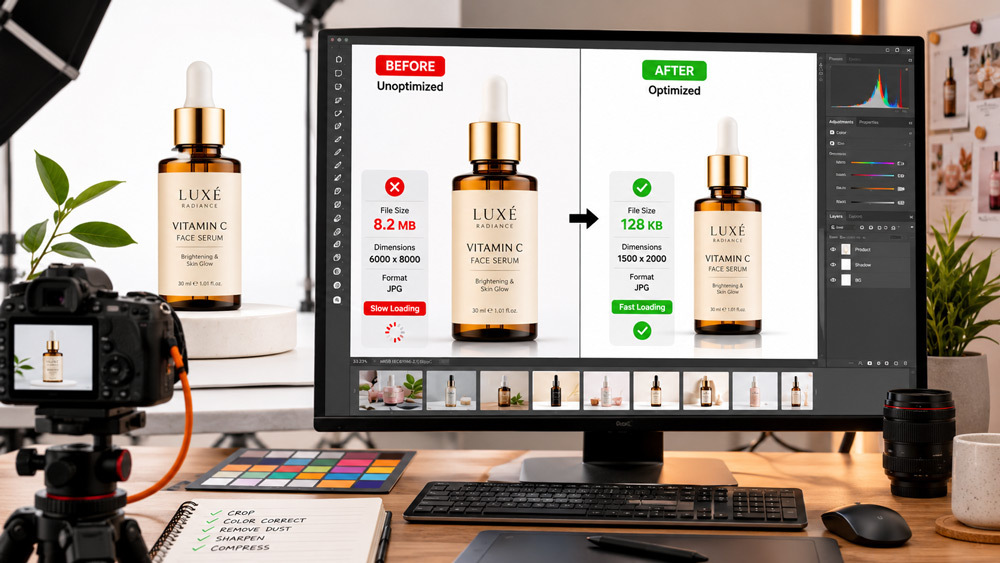
Search engines and marketplaces now score product pages on how quickly the hero image renders on a mid-range Android phone, which is exactly what ecommerce image optimization solves. Ckstudio audits regularly show product pages losing three to five hundred milliseconds of LCP purely because a 3MB hero JPEG was uploaded without resizing. When Prince and the team retrofit ecommerce image optimization onto an existing D2C store, the same catalogue routinely moves from a “Needs Improvement” Core Web Vitals grade to “Good” without touching a single line of theme code, as our product photography tips guide also shows.
Every serious ecommerce image optimization workflow rests on three pillars. Technical optimization covers file size, format, dimensions, colour profile and delivery. Visual optimization covers styling, background, lighting, cropping and consistency across a catalogue. SEO optimization covers file names, alt text, captions, image sitemaps and schema. Ignore any one pillar and you either get a fast page with ugly photos, a beautiful page that will not rank, or a well-tagged catalogue that Google cannot crawl efficiently — an approach Ckstudio’s selection guide for ecommerce photography partners unpacks in more detail.
Product images are the single heaviest asset on almost every ecommerce page, so product image optimization disproportionately controls how fast a page feels and how well it converts. On mid-range Indian smartphones over 4G, an unoptimised hero image can single-handedly push LCP above four seconds and CLS above 0.15, which Google now treats as a ranking signal for mobile search results. Ecommerce image optimization is therefore not a design choice — it is a search and revenue lever.
Google reads file names, alt attributes, surrounding text and structured data to decide whether an image belongs on the image search results page. A well-optimized product photo can attract discovery traffic on its own, especially in visual verticals like fashion, jewellery, home decor and beauty. Ckstudio has seen client stores earn a meaningful share of traffic from Google image search once they align ecommerce image optimization with the same keyword targeting used on the product description, an approach detailed further in our 2026 marketplace image standards guide.
Ecommerce image optimization is the fastest way to fix Largest Contentful Paint, because on most product pages the LCP element is the primary product image. Bringing a 2.4MB JPEG down to a 90KB WebP without visible quality loss regularly cuts LCP by more than a second on a Moto G-class device. Combined with explicit width and height attributes to prevent CLS, this alone can move a store from failing to passing Core Web Vitals — and it is far cheaper than a theme rebuild.
Shoppers judge product credibility in the first two to three seconds, which means blurry, laggy or inconsistent images silently kill conversion. Ecommerce image optimization protects that first impression by keeping images sharp on retina screens, consistent across category pages and quick to render on mobile. Ckstudio’s client data shows that combining professional shoots with disciplined ecommerce image seo and compression tends to reduce returns as well, because customers see the product accurately before they buy — a pattern Prince has documented across categories from apparel to jewellery, and one that our internal behind the scenes photography workflow reflects too.
Format choice is the most impactful single decision in ecommerce image optimization, because it sets the ceiling on how small the file can get without visible quality loss. In 2026, WebP is the ecommerce default, AVIF is an emerging next-gen contender, JPEG remains the marketplace safe harbour and PNG stays reserved for genuine transparency needs like ghost mannequin cutouts. Getting the format right early avoids reshoots, re-exports and re-uploads later.
| Format | Best Use Case | Avg File Size | Transparency | Browser Support |
|---|---|---|---|---|
| JPEG | Marketplace uploads, lifestyle shots | Baseline | No | Universal |
| PNG | Cutouts, transparent logos, ghost mannequin | 2–3× JPEG | Yes | Universal |
| WebP | Website product galleries, hero images | 25–35% smaller than JPEG | Yes | All modern browsers |
| AVIF | Next-gen sites, high-volume catalogues | Up to 50% smaller than JPEG | Yes | Modern browsers, growing |
JPEG stays relevant in ecommerce image optimization because most Indian marketplaces still require or prefer it. Ckstudio uses JPEG for Amazon main images, Flipkart primary uploads and situations where absolute compatibility matters more than raw compression ratio. When quality is set between 78 and 85, JPEG still delivers acceptable file sizes for product photography where WebP is not accepted.
PNG earns its keep only when transparency is non-negotiable — for example, ghost mannequin flat cutouts, packaging shots on a transparent background, or hero logos over coloured backgrounds. Beyond that, PNG is usually wasteful in ecommerce image optimization because uncompressed PNGs can be two to three times heavier than JPEG for the same visual result, which is exactly the opposite of what a product page needs.
WebP is the modern default for ecommerce image optimization because it delivers roughly 25 to 35 percent smaller files than JPEG at equal perceived quality while also supporting transparency. Every current browser, Shopify, WooCommerce and most Indian ecommerce stacks now serve WebP natively. For a mid-sized catalogue of five thousand SKUs, switching hero shots from JPEG to WebP can save tens of gigabytes of monthly bandwidth alongside a measurable LCP improvement, which is why Ckstudio treats WebP as the baseline output for every shoot.
AVIF can compress even harder than WebP and now covers over 90 percent of browsers, but tooling, plugin support and marketplace acceptance are still uneven. For most Indian D2C stores in 2026, the safe pattern is to lead with WebP for site-wide ecommerce image optimization and layer AVIF on top for the largest hero images where the extra compression translates to real bandwidth savings. As always, keep a JPEG fallback so no visitor sees a broken image.
Dimensions and file size are the second lever in ecommerce image optimization after format. Oversized images waste bandwidth and slow the page down; undersized images look soft on retina screens and fail zoom requirements on marketplaces. The Ckstudio workflow keeps a single high-resolution master and then exports carefully sized variants for each destination, which is the backbone of any scalable high-volume catalogue workflow.
For a modern ecommerce site, a 1500 to 2000 pixel square master is the practical sweet spot for ecommerce image optimization. It is large enough for retina displays and zoom, small enough to compress cleanly and versatile enough to downsize into thumbnails, gallery tiles and mobile-first srcset variants. For very image-heavy verticals like jewellery photography, going up to 2500 pixels on the master is defensible; anything larger is almost always wasted.
The internal Ckstudio rule for ecommerce image optimization is simple: every product image on the storefront should sit under 100KB after WebP conversion, and no product image should ever cross 300KB. Below 100KB, pages feel instant on 4G; between 100 and 300KB, expect a small but real LCP hit; above 300KB, mobile users start bouncing before the fold renders. Marketplaces like Amazon impose their own file size caps, but treating 100KB as the target keeps every downstream export well inside their limits.
Compression is where ecommerce image optimization goes from theory to daily practice. The trick is to compress aggressively but stop just before the human eye can spot the difference. Ckstudio’s studio pipeline pairs a lossless master archive with a lossy production export, so the source stays pristine while every live image is squeezed for speed.
Lossless compression rearranges data without discarding any of it, which keeps the image mathematically identical to the original but only saves modest space. Lossy compression discards visually insignificant detail, which is what makes real ecommerce image optimization possible; WebP and JPEG at quality 80 usually strike the right balance. For product pages, lossy is almost always the right call because the perceptual cost is nearly zero while the file size drop is dramatic.
Free options like TinyPNG and Squoosh cover most single-image compression needs cleanly. Paid options like ShortPixel, Optimole and Imagify plug into WordPress and WooCommerce for bulk automation. For teams shooting hundreds of SKUs a month, Ckstudio typically recommends a two-tool stack: a batch compressor for the site catalogue plus a CDN like Cloudinary that handles on-the-fly ecommerce image optimization based on the visitor’s device and browser.
The scalable ecommerce image optimization workflow used at Ckstudio looks like this: shoot at raw or full-resolution, retouch to a 2000 pixel master, batch export to WebP at quality 82, run the batch through a compressor and finally push to a CDN with responsive delivery on. For a fifty-SKU shoot, that pipeline takes two to three hours and leaves every image both marketplace-ready and blazing fast on the storefront. This is roughly the same rhythm we describe in our ecommerce photography workflow guide.
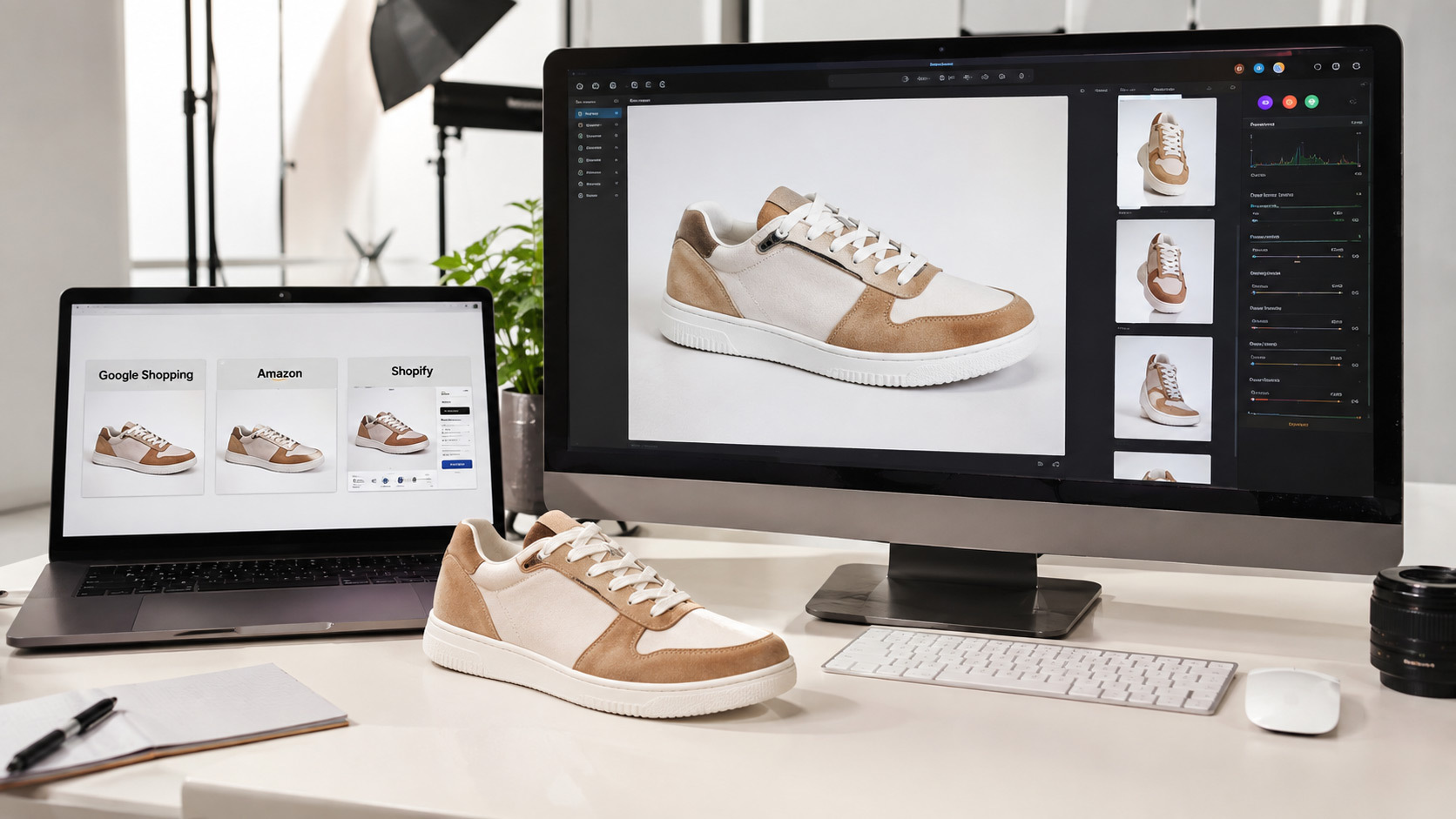
Once files are compressed and formatted, ecommerce image optimization becomes an SEO exercise. Google needs cues to understand what is in the image, whether it belongs on the search results page and how it relates to the product. Three signals do most of the work: file names, alt text and structured data. If you get these right, image search can quietly become a top three traffic source for a well-photographed D2C catalogue.
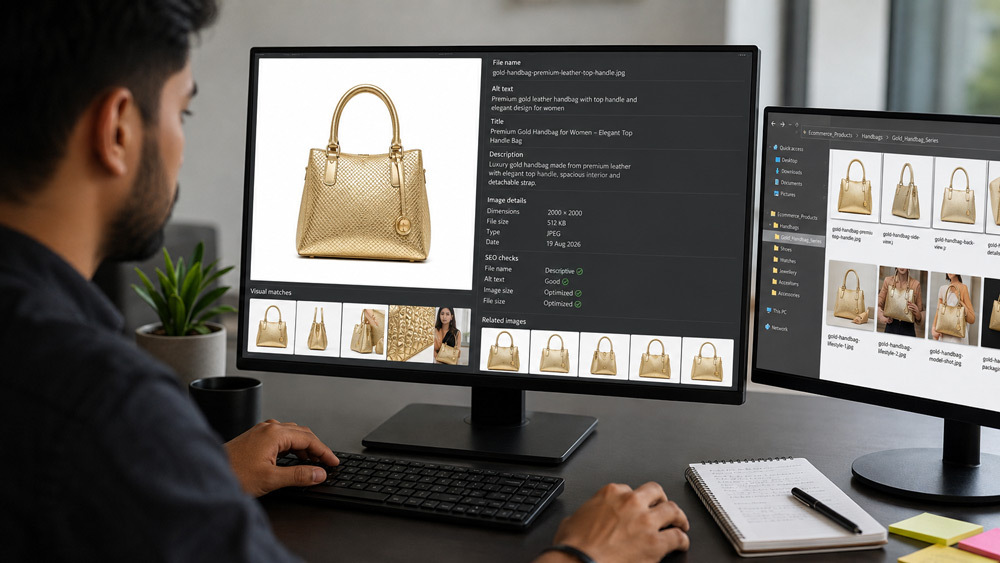
File names are one of the most-ignored parts of ecommerce image optimization. “IMG_2374.jpg” tells Google nothing, but “blue-cotton-kurta-front-view.webp” tells both the crawler and a screen reader exactly what the image contains. Ckstudio’s naming convention pairs the product name, colour or variant and view angle in a hyphenated slug, which keeps file names short, descriptive and consistent across the catalogue.
Alt text is the second most-cited miss in ecommerce image optimization audits. A good product alt text describes the visible product plainly, includes the focus keyword when it fits naturally and stays under fifteen words. “Blue cotton kurta with mandarin collar for ecommerce product photography catalogue on white background” is far more useful than “blue kurta.” Well-written alt text serves both accessibility and image SEO at once, which is why we treat it as a mandatory field in every Ckstudio shoot deliverable.
An image sitemap tells Google where every product image lives, and Product plus ImageObject schema tells Google what each image represents. Together, they turn ecommerce image optimization from an on-page tactic into a discoverable data layer. Most Shopify and WordPress themes generate a basic image sitemap automatically; the Ckstudio recommendation is to layer explicit Product schema with an image property on every PDP so search engines can join the dots reliably.
Amazon has the strictest image rules of any Indian marketplace, so ecommerce image optimization for Amazon deserves its own workflow. The main image is essentially non-negotiable: pure white background, product filling at least 85 percent of the frame, no props and no logos. Miss any of these and Amazon can suppress the listing, which is exactly why Ckstudio’s Amazon product photography service starts every session with a compliance checklist.
Amazon’s main image spec requires a pure RGB 255,255,255 white background, sRGB colour space, JPEG format and no additional text, watermark or accessory that is not part of the product. In practical Amazon product image optimization terms, this means shooting on a dedicated white cyc, cleaning up shadows in post and exporting via a controlled colour profile. Ckstudio audits show that a single suppressed main image can cost a seller thousands of rupees in daily revenue, so the guardrails here are worth every extra minute in post.
Amazon’s zoom feature only activates on the product page when the uploaded image is at least 1600 pixels on its longest side. Anything smaller loses zoom, which correlates directly with a drop in conversion. The Ckstudio standard for Amazon ecommerce image optimization is a 2000 pixel square export, so the zoom feature works, the file still compresses well under Amazon’s size limit and the same master can be reused for Flipkart and the storefront. Prince and the team explain more of this in our complete Amazon photography guide for 2026.
Beyond the main image, Amazon allows up to six secondary images plus one video, and this is where e-commerce image seo meets storytelling. Lifestyle shots show the product in use, Amazon infographic images highlight key features with callouts, and comparison graphics answer objections before the shopper scrolls to reviews. Optimize each of these separately; they carry their own alt text and file naming rules within the Amazon Seller Central image guidelines, published by Amazon Seller Central India.
Shopify handles a surprising amount of ecommerce image optimization automatically, which is both a blessing and a trap. It auto-serves WebP where the browser supports it, lazy-loads below-the-fold images and generates responsive srcset variants — but only if the source image you upload is well prepared. Feed Shopify a 5MB uncompressed JPEG and even its clever pipeline cannot rescue you.
Shopify accepts product images up to 4472 × 4472 pixels and 20MB, but that is a ceiling, not a target. For real-world ecommerce image optimization, upload a clean 2000 pixel square master and let Shopify’s image pipeline resize down. Uploading anywhere close to the maximum wastes storage, slows the theme editor and provides no visible benefit on the storefront.
Shopify’s built-in image transformations serve WebP automatically to compatible browsers and lazy-load off-screen images by default in most modern themes. That means good ecommerce image optimization on Shopify is mostly about giving the platform good inputs — 2000 pixel sRGB masters, sensible file names and descriptive alt text. If your theme still uses old-style hard-coded image tags, upgrade to a Dawn-style theme so the built-in responsive image pipeline can do its job.
Shopify’s default product gallery pulls the highest-resolution image for zoom and hover, so uploading correctly sized masters directly improves the shopping experience. For fashion, jewellery and detailed hardware, pair zoom-ready ecommerce image optimization with at least four to six angles per SKU and one clear scale reference shot. That combination reduces returns almost as much as any UX tweak can.
Beyond Amazon and Shopify, each Indian marketplace has its own ecommerce image optimization rulebook. Ignoring these guidelines is one of the top reasons listings get rejected, downranked or quietly de-prioritised in category feeds. Sellers who apply the platform-specific tweaks below usually see faster listing approvals and better conversion inside each marketplace.
| Marketplace | Recommended Dimensions | Format | Background | Notes |
|---|---|---|---|---|
| Amazon India | 2000 × 2000 px | JPEG (sRGB) | Pure white | Zoom requires 1600px+ |
| Flipkart | 2000 × 2000 px | JPEG | White / neutral | Frame fill 85% |
| Myntra | 1080 × 1440 px | JPEG | Model + neutral | Fashion-first ratio |
| Ajio | 1080 × 1440 px | JPEG | Editorial neutral | Model plus flat lay |
| Meesho | 1200 × 1200 px | JPEG | Simple white | Fast approvals for clean uploads |
| Nykaa Fashion | 1080 × 1440 px | JPEG | Neutral / editorial | Brand-styled hero shots |
Flipkart rewards clean, well-lit 2000 pixel square uploads on a white or neutral background. Its “Ideal Image Score” internally scores every listing, and consistently high-scoring images earn better placement in category and search results. For sellers looking to standardise Flipkart-ready ecommerce image optimization, our Flipkart product photography service and 2026 Flipkart guidelines guide walk through the exact frame fill, colour and background rules used by top-rated sellers, published by Flipkart Seller Hub.
Myntra and Ajio operate in a fashion-first frame — vertical 1080 × 1440 pixel model shots with strong editorial styling. Ecommerce image optimization for these platforms means shooting on-model with clean backgrounds, sharp fabric detail and neutral colour rendering that survives their platform-side compression. Ckstudio’s Myntra photography service is built around exactly this brief.
Meesho favours clean, simple white-background uploads at 1200 pixels square, and approvals move fast when the image is sharp and correctly framed. Nykaa Fashion leans editorial with 1080 × 1440 pixel hero shots, while FirstCry prefers bright, cheerful lifestyle context alongside a clean primary. Our Meesho photography beginner’s guide covers the exact ecommerce image optimization tweaks that reduce Meesho catalogue rejection rates for new sellers.
Over 80 percent of ecommerce traffic in India is mobile, so mobile-first ecommerce image optimization is not optional. That means designing image workflows for a 6.1 inch screen on a mid-range Android over 4G first, and treating desktop as the enhancement rather than the primary target. Every optimization decision — dimensions, format, srcset breakpoints — should be validated on a real mid-range phone, not just in a laptop preview.
The srcset attribute lets you offer multiple sizes of the same product image and let the browser pick the smallest one that fits. For ecommerce image optimization, that typically means exporting 400, 800, 1200 and 2000 pixel variants of every product image and letting Shopify, WordPress or your custom stack serve the right one per breakpoint. This can easily halve the total image bytes shipped to a phone.
Lazy loading defers off-screen images until the user scrolls near them, which is one of the biggest wins in ecommerce image optimization for long PDPs. Add loading=”lazy” to every image below the fold, and — critically — never lazy-load the LCP hero image, because that will delay the very metric you are trying to improve. Ckstudio’s audit checklist always separates hero from below-the-fold behaviour explicitly.
Google’s Core Web Vitals — LCP, CLS and INP — are heavily influenced by images, so ecommerce image optimization is essentially the front line of Core Web Vitals work. On most PDPs, LCP is the hero product image, CLS spikes when images load without reserved space and INP is impacted when the main thread is busy decoding heavy JPEGs. Fix the images and the vitals usually follow.
To fix LCP, Ckstudio’s ecommerce image optimization playbook is: shrink the hero to 2000 pixels or less, convert to WebP, compress below 100KB, add fetchpriority=”high” on the hero and never lazy-load it. Following these four steps has repeatedly moved client PDPs from a 4-second LCP to under 2.5 seconds on real 4G, with no theme changes. Combine that with the layout tips in our conversion-focused ecommerce photography guide and you get compounding gains.
CLS spikes when images arrive after layout is calculated and shove content around. The fix is embarrassingly simple: always set explicit width and height (or aspect-ratio in CSS) on every product image so the browser reserves the space before the bytes arrive. This one habit alone can drop CLS from a failing 0.25 to a passing 0.05, and it costs nothing to implement across a catalogue.
The right stack takes ecommerce image optimization from a manual chore to an automated pipeline. Ckstudio splits tools into three layers — desktop editing, batch compression and CDN delivery — because each layer solves a different bottleneck. Get the layers right and a fifty-SKU shoot can go from camera to live PDP inside a single working day.
An image CDN sits between your storage and your visitor and performs ecommerce image optimization on the fly — resizing, converting and compressing based on the visitor’s device. Cloudinary is the most feature-rich, Bunny CDN is one of the most cost-effective for Indian traffic, and Imgix has strong developer tooling. For most D2C brands scaling past a few thousand SKUs, moving images behind a CDN pays for itself within a couple of months in reduced bandwidth and improved conversion.
On WordPress and WooCommerce, plugins like ShortPixel, Imagify and Smush automate bulk ecommerce image optimization, WebP conversion and lazy loading. On Shopify, apps like TinyIMG and Crush.pics do similar work inside the platform. Set them once, whitelist the image folders and let the plugin handle new uploads automatically — while Ckstudio still ships pre-optimized files, redundancy at the plugin level is a healthy safety net.
Most ecommerce image optimization problems Ckstudio sees on client audits fall into a handful of repeat mistakes. Fixing these is often faster and cheaper than any bigger performance project, and the wins compound across the whole catalogue.
The single most common ecommerce image optimization mistake is uploading raw exports straight from the camera or a design tool. A 5MB PNG hero image will slow the page down no matter how good the theme is. Every image should be pre-processed through a compressor before it reaches the storefront, no exceptions.
Uploading a 1:1 square to Myntra or a 3:4 vertical to Amazon is a fast route to rejection or awkward auto-cropping. Marketplace-aware ecommerce image optimization means exporting the correct aspect ratio per destination from the same master, not reusing one export everywhere. A simple export preset in Photoshop or Capture One takes ten minutes to build and saves hours of rework.
Alt text that is either missing or crammed with every possible keyword hurts both accessibility and image SEO. Good ecommerce image optimization treats alt text as descriptive copywriting: describe the product, include the focus keyword only when it fits and never repeat the same alt text across multiple images on the same page.
Ckstudio’s internal ecommerce image optimization checklist covers the full workflow from shoot to live PDP. Use this as a pre-launch review before any new catalogue goes live, whether the SKUs were shot in-house or by a partner studio.
Ckstudio runs a full-stack ecommerce image optimization pipeline out of its Delhi NCR studio, combining shoots with post-production, WebP conversion, alt text, marketplace-ready exports and CDN-ready delivery. Prince and the team have supported over 500 brands with a workflow that starts with a professional shoot on Canon R10, Sony A7R V and a Godox SK 400II plus Elinchrom lighting setup, and ends with pixel-perfect files ready for Google, Amazon, Shopify, Flipkart, Myntra, Meesho, Ajio and D2C storefronts.
For brands that would rather outsource ecommerce image optimization end-to-end, Ckstudio offers volume packages that include shoot, retouching, WebP conversion, alt text writing and marketplace-ready exports. Prince personally reviews every catalogue before delivery. Get in touch on +91-8700258773, WhatsApp us at +91-8700258773 or email [email protected] to schedule a free ecommerce image optimization audit.
Book a free 15-minute ecommerce image optimization audit with Prince and the Ckstudio team. Send your product page URL and we will send back a prioritised fix list.
Call Prince: +91-8700258773Ecommerce image optimization is the process of reducing product image file size, choosing the right format (like WebP), setting correct dimensions and adding SEO metadata so product photos load fast, rank higher on Google and meet marketplace guidelines like Amazon and Shopify.
WebP is the best format for ecommerce product photos in 2026. It offers 25 to 35 percent smaller file sizes than JPEG at equal quality and is supported by every modern browser, Shopify and Google.
Aim for under 100KB per product image for optimal page speed, with a resolution between 1500 × 1500 and 2000 × 2000 pixels so that zoom functionality on marketplaces and stores still works cleanly.
Yes. Optimized images improve Core Web Vitals scores like LCP, reduce bounce rate, enhance mobile UX and can rank in Google Image Search when paired with proper alt text, file names and image sitemaps.
Use a master image at 2000 × 2000 pixels in RGB, then export a WebP copy for Shopify and an sRGB JPEG copy with a pure white background and 85 percent frame fill for Amazon. Keep both versions under 500KB. Ckstudio automates this dual pipeline for D2C brands.
Professional ecommerce image optimization in India typically costs between rupees 25 and rupees 150 per image depending on retouching depth, background cleanup and marketplace variants required. Ckstudio offers volume packages starting from rupees 99 per image with WebP conversion and alt text included, similar to the tiers explained in our 2026 ecommerce photography pricing guide.
Ecommerce image optimization is one of the few levers that improves speed, SEO and conversion at the same time. Get the format right, size images sensibly, compress before uploading, write real alt text and match each marketplace’s spec — and Google, Amazon, Shopify, Flipkart and Myntra will all quietly reward the effort. Ckstudio has seen this pattern hold across hundreds of catalogues, from single-founder D2C brands to national retailers scaling into thousands of SKUs.
If you would like Ckstudio to run this ecommerce image optimization playbook on your catalogue end-to-end, Prince and the team are ready. Reach out on +91-8700258773 or email [email protected], and we will start with a free audit of a live product page.

