





Fashion Photography Services





E-commerce Photography




A structured, seller-focused guide to planning marketplace-ready Flipkart product images — from the first thumbnail to the final trust frame.
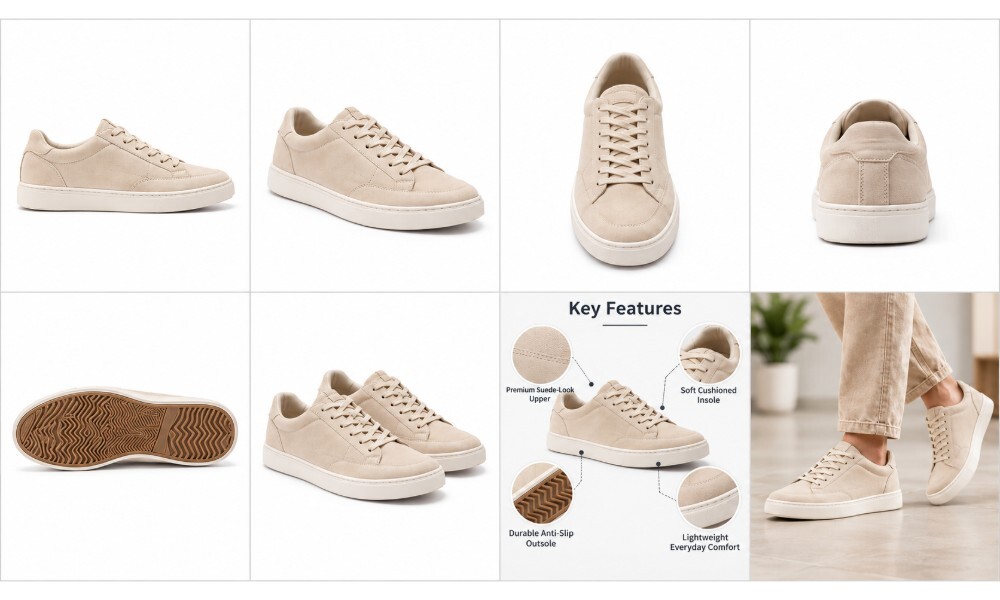
A strong Flipkart listing needs far more than one well-lit product photograph. Flipkart listing images are the primary communication channel between a seller and a buyer who cannot touch, feel or examine the product in person. The way you sequence, frame and organise your product gallery determines whether a shopper clicks past your listing or adds to cart. This guide walks through the complete image planning process — covering the best image sequence, the most useful product angles, how to use infographics effectively and the conversion principles that separate a high-performing catalogue from an average one.
At Ckstudio, Prince and the studio team have worked on Flipkart product photography across hundreds of categories — from apparel and jewellery to electronics, cosmetics and home furnishings. This guide reflects the practical decisions that go into building a gallery that earns buyer confidence. Whether you are preparing your first SKU or refreshing an existing catalogue, the framework here gives you a repeatable structure you can apply across any product type.
Mobile commerce in India has changed how shoppers evaluate products. A buyer on Flipkart typically swipes through a product gallery before reading a single specification. Flipkart product images are the first and often the only mechanism through which a seller communicates product design, scale, material quality, colour accuracy and included accessories — all in the few seconds before a shopper moves to the next listing.
Flipkart’s own Seller Hub documentation acknowledges that precise product information combined with clear and captivating images can improve platform visibility by up to 15%. A well-constructed product image gallery does more than satisfy compliance requirements — it actively supports your advertising performance, reduces buyer uncertainty and provides the visual evidence a shopper needs to commit. As the Flipkart product photography landscape has matured, listings with structured, professional image sets consistently outperform those built on a single hero image and a few rough angles.
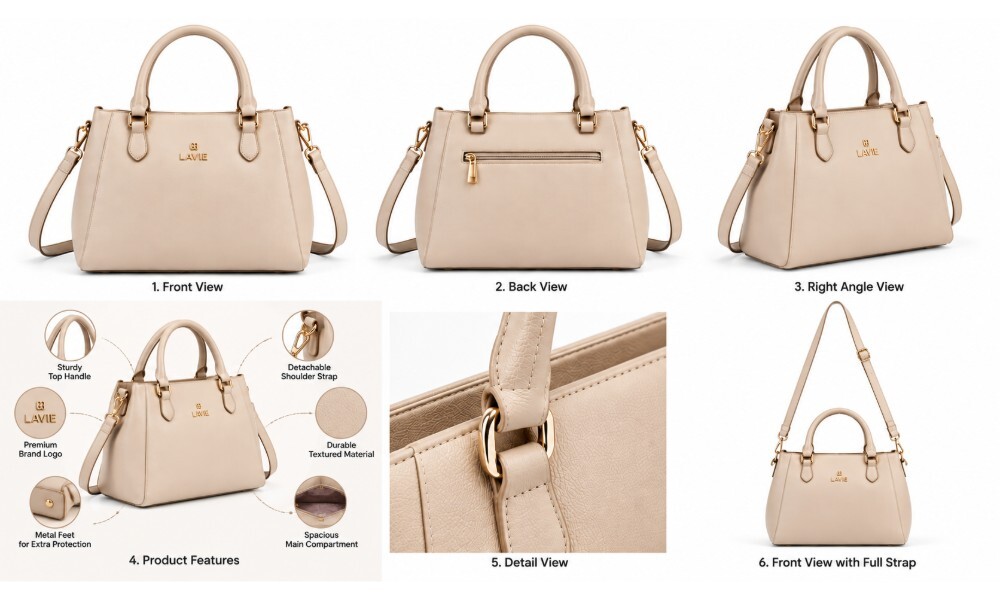
Structured multi-angle Flipkart listing images give buyers a complete view of the product from every relevant perspective.
The decision chain on Flipkart is short: thumbnail clarity drives a product-page click, gallery engagement builds product understanding and product understanding builds purchase confidence. A weak thumbnail — one where the product is small, poorly lit or visually cluttered — reduces click-through rate before a shopper has read the title or price. Once inside the listing, each subsequent Flipkart product listing image either reinforces or erodes trust. Listings that answer the buyer’s visual questions inside the gallery convert better and generate fewer post-purchase queries.
The shift toward ecommerce product photography as a commercial investment rather than a compliance exercise is well underway among D2C brands and established marketplace sellers alike. Brands listing across Flipkart, Myntra and Amazon now treat their product image gallery as a core conversion asset — not an afterthought.
Returns on Indian marketplaces are often driven by expectation gaps — a product arrives and looks different in colour, is larger or smaller than expected, or does not include the accessory shown in the listing. Accurate ecommerce product images with precise colour representation, a clear size or scale reference, visible material detail and realistic packaging information help buyers make informed decisions. This is not a guarantee of lower return rates — many factors influence returns — but it is the most controllable variable in the seller’s product presentation.
Flipkart image requirements are not universal. Different product categories and verticals can have different format specifications, resolution minimums, aspect ratio requirements and maximum image counts. Flipkart Commerce Cloud (FCC) documentation notes that image validation covers format, resolution, aspect ratio and minimum image count — configured per vertical. Always confirm the current requirements for your specific category in Flipkart Seller Hub before a large catalogue upload. Relying on generalisations from third-party sources — including older guides — can lead to QC rejections or suppressed listings.
The current Flipkart and FCC documentation confirms that image validation parameters include file format (typically JPEG/JPG), resolution, aspect ratio and a minimum image count threshold — all configurable by product vertical. RGB colour space is the standard. Uploading images that do not meet the technical threshold for your category typically results in QC rejection or catalogue quality flags. Sellers should review the Flipkart image guidelines section inside Seller Hub periodically, as requirements are updated when platform policies change.
In practical marketplace photography work, a recurring issue is resolution mismatch — images that pass visual inspection but fail automated validation because they were exported at screen resolution rather than print or catalogue quality. Always export final Flipkart product images at the highest reasonable resolution within the file-size limit your vertical allows.
The primary image is the hero thumbnail your listing shows in search results and category pages. It carries the entire first-impression load. The product should be instantly identifiable, accurately coloured and shot in a clean, uncluttered composition. Pricing overlays, promotional banners and unnecessary watermarks are prohibited from the main image in most categories — and even where technically allowed, they reduce professional presentation quality. Check the background requirements for your specific vertical: some categories have explicit white or plain-background rules, while others allow lifestyle contexts on the primary image.
Explore how Amazon product photography and Flipkart photography conventions compare in our recent guide on AI Flipkart photography vs real photoshoot 2026-27.
Once the primary image earns the click, the secondary image slots give you the space to communicate what one angle cannot. Secondary Flipkart listing images can carry additional angles, close-up material details, size and dimension information, feature callouts, lifestyle context, packaging contents and accessory views. All secondary content must remain factually accurate and comply with current category rules — promotional pricing and offer overlays are generally not permitted in image content.
For most products, a strong Flipkart listing image sequence starts with a clean hero image, followed by alternate angles, rear or side views, detail shots, dimensions, feature infographics, lifestyle context and an image showing packaging or included items. The exact sequence should be adapted to the product category and Flipkart’s current image rules. This is what Ckstudio calls the 8-Image Flipkart Listing Framework — a repeatable structure that ensures every buyer question gets a visual answer.
Clean, product-forward. The most recognisable angle. Strong thumbnail visibility. Accurate colour. The product dominates the frame with minimal distraction.
Show the complete product form more clearly than the hero alone. A three-quarter view often communicates depth and three-dimensional shape better than a flat front shot.
Reveal details the main image cannot show — back panel, clasp, zipper, port arrangement, rear labelling or any feature that exists outside the primary face.
Texture, stitching, finish, buttons, hardware, surface grain or material construction — depending on the category. This image builds material trust at a macro level.
Height, width, depth, capacity or model measurements. A scale reference prevents the single most common source of buyer disappointment on marketplace listings.
Highlight 3–5 genuinely useful product features. Designed for mobile screens. Factual callout text, clean layout, no promotional clutter.
Show the product in a realistic context when appropriate. Communicates scale, styling, usage scenario and intended audience in a single frame.
Box contents, accessories, packaging presentation or product variants. Sets accurate expectations and reduces returns from “not as described” buyer feedback.
| Image | Recommended Shot | Main Purpose | Buyer Question Answered |
|---|---|---|---|
| 1 | Hero / Main Image | Attract search attention | What is the product? |
| 2 | Front / Three-Quarter | Show overall product form | What does it look like? |
| 3 | Side / Rear View | Reveal hidden details | What does the other side look like? |
| 4 | Close-Up Detail | Show material quality | What are the materials and finishing? |
| 5 | Dimensions / Scale | Establish physical size | How large is it? |
| 6 | Feature Infographic | Explain key benefits | What makes this product useful? |
| 7 | Lifestyle / In-Use | Show real-world context | How will it look or work in practice? |
| 8 | Packaging / What’s Included | Set accurate expectations | What will I actually receive? |
The sequence above is a framework, not a rigid rule. A kitchen appliance listing will prioritise the usage and scale images differently from a jewellery listing. The underlying principle — that every image should answer a different buyer question — applies across all categories. Our detailed post on Flipkart product photography for 2026-27 covers category-specific variations in greater depth.
The right product angles vary significantly by category. What works for a packaged cosmetic product — label front, dispensing mechanism, usage texture — is completely different from what works for a garment or a piece of jewellery. This section covers the most practical angle sets by vertical, based on Ckstudio’s experience with ecommerce product photography across hundreds of brands.
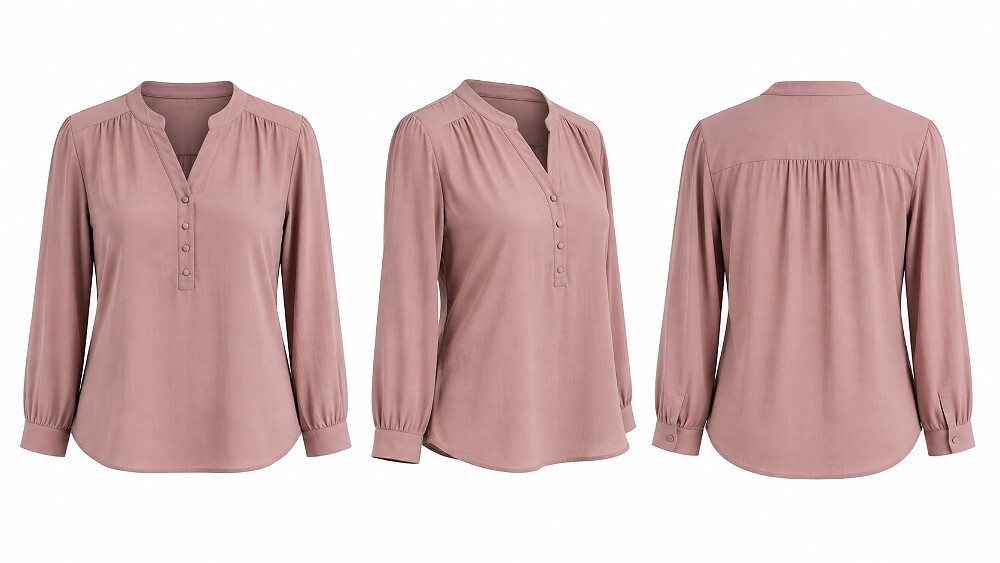
Fashion and apparel photography at an Indian standard ecommerce photography studio requires front, three-quarter, rear and fabric close-up angles as a minimum set.
Fashion photography for Flipkart benefits from the most comprehensive angle set of any category. The recommended sequence covers: front view, back view, side profile, three-quarter angle, fabric or detail close-up, a fit image on a model or ghost mannequin, and a size or measurement reference image. Garments should communicate shape, fabric texture, drape, fit silhouette and any design detail — embroidery, print, stitching pattern — that cannot be inferred from the hero image alone.
For garment photoshoots, Ckstudio uses a combination of ghost mannequin photography and on-model shoots depending on the brand’s catalogue guidelines and the garment type. Ghost mannequin is highly consistent and cost-effective at scale; model photography adds lifestyle context and styling information that is difficult to communicate otherwise. See our detailed guide on choosing the right background for fashion ecommerce photography for practical production decisions.
For jewellery photography, the recommended sequence is: hero shot, front view, side or profile view, clasp or mechanism detail, a macro close-up of finish and stone setting, a scale reference against a hand or ruler, and a lifestyle or on-model image. Jewellery Flipkart product images live or die on colour accuracy and reflection control — the gemstone must look like the gemstone, and the metal finish must match what the buyer receives. Our dedicated post on jewellery photography lighting and studio techniques covers the technical challenges in detail.
Electronics listings benefit from a structured technical angle set: hero front image, full front panel, rear panel, side profile, close-up of ports and controls, a dimension or size reference image, an accessories or box-contents image, and a usage context shot showing the device in an appropriate environment. Electronic product photography requires careful management of reflections on screens and glossy surfaces, accurate colour rendering of indicator lights and display elements, and consistent framing across SKUs in a product range.
For beauty and cosmetic photography, the sequence typically runs: label-front packaging, rear or ingredient label, side profile, applicator or dispensing mechanism, product texture where useful (a smear, a swatch, a foam), a volume or size reference, and a lifestyle or usage context image. All images must represent the product accurately — no retouching that changes product colour or skin representation beyond normal colour correction. Avoid any claims in secondary image text that cannot be supported by the product specification.
Infographic images are one of the most misused tools in marketplace listing photography. When done well, a product infographic in the secondary image slot communicates precise, buyer-relevant information in a format that is faster to absorb than specification text. When done poorly, it becomes a wall of promotional copy, tiny text and overlapping badges that confuses rather than informs. The guiding rule at Ckstudio is simple: every text element in a Flipkart product infographic should answer a question the buyer cannot answer from the other images alone.
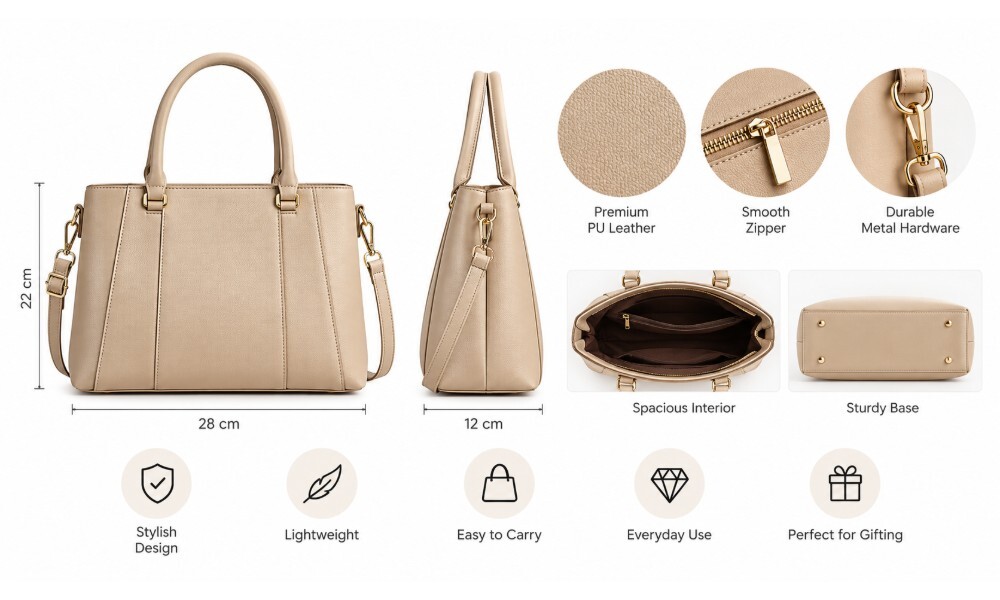
Well-designed infographic images for Flipkart carry factual, concise information optimised for mobile screen readability.
The most useful information categories for ecommerce product infographic secondary images are: product dimensions (height × width × depth or diameter), material composition, key technical features relevant to purchase decision, capacity (volume, weight, number of units), compatibility information (device model, age range, size chart), included components or accessories, care or usage instructions, and a feature comparison or highlight of a genuinely differentiating specification.
All infographic text must be legible at mobile screen size — test the finished image at 375px width before uploading. If a single callout requires more than 6–8 words to communicate, it is likely too complex for an image overlay and belongs in the product description text instead. Ckstudio’s Flipkart A+ content guide for 2026-27 covers how structured content panels can extend what product images start.
After several hundred marketplace video shoots, Prince and the Ckstudio team distilled the pattern that separates strong Flipkart listing videos from average ones into a four-step framework we call FLIP. It is intentionally simple, so it can survive the pressure of large-catalogue production.
Gallery structure and image quality directly influence how a listing performs — on click-through from search, on time-in-gallery and ultimately on purchase decision. These nine principles are drawn from Ckstudio’s experience producing Flipkart product photography at catalogue scale and reflect what consistently makes listings more competitive.
The majority of Flipkart shoppers browse on mobile devices. This means your Flipkart listing images must work at small screen sizes before they work at desktop resolution. Large product visibility within the frame, legible infographic text, clean compositions with minimal peripheral distraction and a strong visual hierarchy — these are the practical requirements for a mobile-optimised gallery. Avoid complex multi-element compositions in early gallery slots; save visual complexity for the feature infographic where the buyer is already engaged.
For brands selling fashion or lifestyle products, our post on how professional ecommerce photography increases conversion rates covers the relationship between image production investment and listing performance in practical terms.
An image that looks polished in isolation may not be the right image for a given listing. Track product-page traffic, click-through rate from search where Seller Hub exposes it, conversion rate, customer questions and return reasons after any significant image update. Advertising campaign performance — particularly cost-per-click and return on ad spend — also responds to underlying catalogue quality. Photography is one variable; pricing, title, keywords and category placement are others. Evaluate image performance as part of a holistic listing optimisation approach rather than in isolation.
For a deeper look at common production errors and how to avoid them at scale, see our guide on scaling product photography from 50 to 500 SKUs.
The right production approach depends on catalogue scale, product type, brand positioning and the resources available to the seller. Both DIY and professional routes are viable — the decision should be based on what your specific products and catalogue size actually require.
| Factor | DIY Photography | Professional Photography |
|---|---|---|
| Initial Cost | Lower — basic equipment only | Higher — studio rates, equipment and editing |
| Lighting Control | Dependent on available space and equipment | Full professional lighting control in studio |
| Colour Accuracy | Challenging without calibrated setup | Controlled and consistent across all SKUs |
| Catalogue Consistency | Difficult at scale | Built into the production workflow |
| Complex Products | Difficult — reflective, jewellery, glass | Standard studio capability |
| Model Photography | Requires model sourcing and styling | Handled by studio |
| High SKU Volume | Time-intensive; quality can drift | Scalable with consistent output |
| Infographic Production | Requires design skills and tools | Often bundled with photography |
| Best Use Case | Early testing; small, simple catalogues | D2C brands; fashion; jewellery; 50+ SKUs |
For sellers testing a new product with a very small catalogue — fewer than 10–15 SKUs — or for simple products that photograph well in controlled natural light, DIY production can be a reasonable starting point. The images still need to be clear, accurately coloured and compliant with current category requirements. A lightbox, a clean backdrop, a smartphone with a calibration app and basic post-processing skills can produce listing-quality images for straightforward products at early stage.
Professional Flipkart photography services become significantly more valuable when the catalogue grows beyond 30–40 SKUs, when the product category involves reflective surfaces, fabric texture, jewellery, glass or liquids, when model photography is required, or when the brand needs visual consistency across variants and product ranges. At scale, the per-image cost of professional production typically falls below DIY when editing time, reshoots and QC rejection rates are factored in.
See our comparison guide on AI Flipkart photography versus a real photoshoot in 2026-27 for a fuller look at the current production options available to Indian marketplace sellers.

Professional Flipkart catalogue photography at an Indian standard ecommerce photography studio ensures consistency, colour accuracy and compliance across every SKU in a large product range.
Ckstudio helps brands, manufacturers and ecommerce sellers create structured, marketplace-ready product image sets for Flipkart — covering clean catalogue photography, multi-angle product photography, close-up detail shots and supporting listing visuals including infographic design. With 9+ years of ecommerce photography experience and an in-house Delhi NCR studio equipped with professional strobe lighting (Godox SK 400II and Elinchrom FRX 400 with strip softboxes, octaboxes and beauty dishes), the team can support everything from single-SKU launches to bulk catalogue production runs.
Prince works directly with D2C brands, marketplace agencies and category managers to plan the image sequence, select the most useful angles and build a gallery that performs from thumbnail through to the final trust image. To discuss your Flipkart product photography requirements, call or WhatsApp Prince directly on +91-8700258773 or email [email protected].
Ckstudio produces marketplace-ready product image sets across all categories — from fashion and jewellery to electronics and packaged products.
View Flipkart Services WhatsApp PrinceFor sellers preparing products for their first professional shoot, our guide on how to prepare garments for an ecommerce model photoshoot covers the pre-production steps that make a significant difference to final image quality. For the platform-specific compliance picture, also see our recent Flipkart photoshoot charges Delhi 2026-27 guide.
The exact image count requirement varies by Flipkart product category and vertical — there is no single universal number. Sellers should check the current requirements for their specific vertical in Flipkart Seller Hub before uploading. For conversion-focused listings, use enough images to clearly communicate the product from multiple angles, close-up details, dimensions, key features and usage context. The Ckstudio 8-Image Framework is a practical starting point for most product categories.
A practical sequence starts with a clean hero image, followed by a front or three-quarter angle, a side or rear view, a close-up detail image, a size or dimension reference, a feature infographic, a lifestyle or in-use image and a packaging or included-items image. This is what Ckstudio calls the 8-Image Flipkart Listing Framework. Adapt the sequence to your specific product category and current Seller Hub requirements. Read our full Flipkart product photography guide for 2026-27 for category-specific adaptations.
Yes. Secondary product images can include factual feature callouts, dimension information and product specifications when allowed by the relevant category requirements. Design infographic images for mobile screens first — test legibility at 375px width. Keep all content factual and accurate. Avoid promotional pricing, misleading superlative claims or visual clutter that obscures the product. Review Flipkart A+ content guidance for how structured content panels extend what product images can communicate.
The best angles depend entirely on the product category. Most listings benefit from a main front or three-quarter hero image, plus side, rear and detail views. Fashion requires front, back, side and fabric close-up. Jewellery needs front, profile, clasp detail and macro. Electronics need front, rear, port close-up and accessories. Packaged products need label front, rear label, dispensing mechanism and a size reference. Always photograph every angle that answers a buyer question the other images do not.
Professional photography becomes especially valuable for catalogues above 30–40 SKUs, for fashion and apparel, jewellery, reflective products, products requiring model photography, and brands that need consistent visual presentation across a large product range. At scale, professional production typically costs less per final usable image than DIY when reshoots, editing time and QC rejection rates are included. Contact Ckstudio on +91-8700258773 or [email protected] to discuss requirements.
The main image should show the product clearly, in accurate colour, from its most recognisable angle. The product should fill 80–85% of the frame. The background should be clean and uncluttered — check your vertical’s specific background requirements in Seller Hub. Avoid pricing overlays, watermarks or promotional badges on the primary image. The test: does it immediately communicate what the product is at thumbnail size on a mobile screen?
A high-performing Flipkart product gallery is not the result of a single great photograph — it is the result of a deliberate, structured sequence that communicates the right information at every stage of the buyer’s decision journey. The framework runs: compliance → thumbnail clarity → multiple angles → material detail → dimensions → useful infographics → lifestyle context → accurate expectations → a gallery that converts.
For sellers and brands that need consistent Flipkart listing images across multiple SKUs, Ckstudio can support marketplace-focused product photography, Flipkart catalogue photography and ecommerce image production in Delhi NCR. The studio has been producing listing-ready product images since 2015 — for Amazon, Flipkart, Myntra, Ajio and D2C brand websites — with a production setup built for accuracy, consistency and marketplace compliance at scale.
To get started, call Prince directly on +91-8700258773, send a WhatsApp message on +91-8700258773, or email [email protected] with your product category and approximate SKU count.
Ckstudio’s Delhi NCR studio produces structured, compliance-ready product image sets — from single-SKU launches to bulk catalogue runs across all product categories.
Get in Touch View Our WorkNext step: read the complete Flipkart seller guide 2026.

