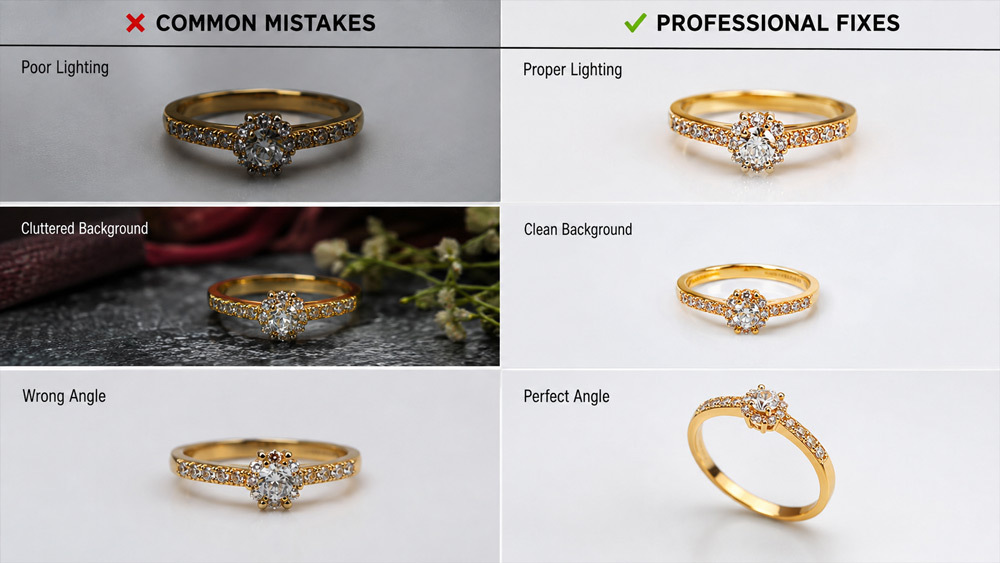
If your jewellery listings look beautiful in your studio yet die a slow death on Amazon and Flipkart, the problem is almost never the product — it’s the photograph. Jewellery photography mistakes are the silent conversion killer for Indian sellers in 2026, and after shooting more than 500 jewellery catalogues at Ckstudio, Prince has watched the same errors repeat across gold, diamond, silver, and imitation ranges alike.
This guide is a diagnostic map. Each of the twelve most common jewellery photography mistakes is paired with the exact professional fix our team uses on live shoots — from softbox angles to marketplace compliance to the retouching line between enhancement and misrepresentation. If you sell jewellery online in India, treat this as your pre-launch checklist. For the full studio walkthrough of every step covered here, our jewellery photography services page shows the complete workflow.
🎯 Who This Guide Is For
- Ecommerce jewellery sellers on Amazon, Flipkart, Myntra, and Meesho
- D2C jewellery brand owners tired of low conversion rates despite quality products
- Marketing agencies managing jewellery clients across marketplaces
- Small studios and independent designers scaling beyond 50 SKUs
- Marketplace catalogue managers dealing with image rejections and returns
Why Jewellery Photography Mistakes Directly Hurt Your Online Sales
Every online jewellery purchase begins as a two-second visual gamble. A shopper scrolling Myntra or Meesho decides in that fraction of a second whether your product is worth a click, and that decision rests entirely on your thumbnail. When jewellery photography mistakes creep in — dull gold, sharp reflections, a shadow-heavy background — the shopper’s brain flags “cheap” and moves on. Multiply that across thousands of impressions daily and the compounding revenue loss is enormous.
The pain sits at three levels. First, ecommerce product image mistakes suppress click-through rate, which in turn suppresses your organic ranking on marketplace search. Second, when a click does happen, weak imagery inflates cart abandonment because buyers cannot confidently visualise the piece. Third, and most damaging, buyers who do purchase return the item because reality does not match the picture — and that return rate then feeds back into your marketplace algorithm as a negative signal. Ckstudio has seen sellers lose ranking positions purely because of image-driven returns, before they even understood the pattern.
The Real Cost of Bad Jewellery Product Photos
Consider the maths that most sellers never sit down to work out. If your listing gets 10,000 impressions monthly with a 1.2% CTR and 3% conversion, that’s 3.6 orders. Fix your photography to lift CTR to 2.4% and conversion to 4.5%, and the same impressions deliver 10.8 orders — a triple, purely from images. Add a 5% reduction in returns from more honest imagery and the profit uplift compounds further. This is the invisible ledger where jewellery photography mistakes quietly bleed you every day.
75%of online buyers rate images as the #1 purchase factor
3.2×CTR uplift on professionally photographed jewellery listings
32%return rate reduction after honest professional retouching
₹8.4Lavg. annual revenue lift for mid-size sellers after fix
What Ecommerce Buyers Expect in 2026
Buyer expectations have moved. A 2026 shopper judges jewellery listings against Nykaa Luxe, Tanishq, and Bluestone-level imagery, whether you’re selling a ₹499 imitation earring or a ₹49,999 diamond pendant. They expect multiple angles, macro detail, a lifestyle context shot, and sometimes a 360° view. Anything less reads as low-trust. This is the modern marketplace compliance bar, and it is invisibly enforced by algorithm ranking, not by rule books. Our detailed breakdown of ecommerce-ready product photography and the Amazon and Flipkart conversion playbook unpack this benchmark further.
The 12 Most Common Jewellery Photography Mistakes (Ranked by Sales Impact)
Ckstudio has ranked these by real-world sales impact, not just by how visually obvious they are. Some of the smallest technical errors — a wrong white balance setting, a missing polariser — cause disproportionately large sales damage because they affect every image across your entire catalogue. Walk through each mistake, check your current photography against it, and note which fixes belong on your next shoot list. If your team wants a structured pre-shoot audit, the Ckstudio jewellery photography checklist works as a one-page reference for every SKU.
- Uncontrolled reflections on metal, stones, and glass
- Poor or harsh lighting setup
- Wrong background choice
- Ignoring marketplace image specifications
- Inaccurate colour reproduction (gold looking dull)
- Missing focus on intricate details
- Over-retouching that kills realism
- Inconsistent catalogue photography
- Skipping 360° and lifestyle shots
- Wrong camera angle and composition
- Low resolution and compression errors
- DIY instead of hiring professionals
Reflections are the number one visual failure Prince sees on rejected Amazon jewellery listings. A polished gold surface behaves like a mirror — it reflects the ceiling, the softbox edges, even the photographer’s silhouette. Amateurs try to fix this in Photoshop afterwards, but by then the damage is baked into the pixels. Reflections in jewellery photography must be controlled at the light source, not in post.
Why Reflections Happen (Metal, Stones, Glass)
Reflections happen because jewellery surfaces are curved, polished, and hyper-reflective. Every point on a ring surface acts as a tiny mirror pointing in a different direction. Diamonds refract light through their facets. Enamel and glass have partial transparency. Without diffusion, your light hits these surfaces raw and bounces back as hot spots — the photographic equivalent of camera flash blowing out a face.
✓ Professional FixHow Professionals Eliminate Reflections
At Ckstudio, we use a light tent enclosure that surrounds the jewellery with 360° soft, even diffusion. Softboxes are positioned at 45° angles, black flags kill unwanted highlights, and a circular polariser filter on the lens cuts residual glare. For diamond and stone work, a black card placed opposite the key light adds definition. Every shoot is captured tethered to a calibrated monitor so reflections are caught and corrected before they leave the set. This is the same protocol our jewellery photography lighting techniques guide documents in full.
The second biggest of the twelve jewellery photography mistakes is treating jewellery lighting like general product lighting. A single overhead LED, or window light alone, creates harsh shadows, uneven exposure, and the dreaded “dull gold” effect. Buyers instantly perceive such photos as low quality even if they cannot articulate why. Behind-the-scenes footage of professional studios, like the one shown in our behind-the-scenes look at Ckstudio, reveals just how much lighting engineering goes into every clean jewellery image.
✓ Professional FixThe Professional Lighting Fix
Ckstudio’s standard jewellery setup uses four Godox SK 400II lights with strip softboxes as key and fill, plus a beauty dish for pieces that need highlight punch. Colour temperature is locked at 5500K to match daylight. A light tent adds omni-directional diffusion. Reflectors and black cards shape the light without adding cost. The result is even diffused lighting, no blown highlights, and gold that reads warm and rich rather than muddy. This equipment logic is the same one that supports every case we shoot at the Ckstudio ecommerce photography studio.
Marketplaces are strict — most require pure white (RGB 255,255,255) primary images — yet sellers repeatedly ship photos with faint grey, textured cloth, or accidentally coloured backgrounds. This ecommerce product image mistake gets listings deranked or outright rejected on Amazon India. Others swing the opposite way and shoot every angle on plain white, missing the storytelling power of a lifestyle background for secondary images.
When to Use White vs Coloured Backgrounds
The rule is simple: main listing image on pure white for every Indian marketplace, secondary and lifestyle images with warm ivory, marble, or velvet backdrops that echo your brand aesthetic. For deeper background strategy across categories, our background selection guide for ecommerce covers material, colour, and marketplace compatibility in detail.
✓ Professional FixCkstudio shoots primary images on seamless white paper or acrylic with careful exposure so that white reads as true white without blown edges. Secondary and lifestyle frames use branded backdrops. Every image is delivered in dual formats so sellers can meet marketplace rules and still have visually rich alternate imagery for their D2C site and social feeds.
Every Indian ecommerce marketplace has published image rules, yet the majority of sellers Prince audits are non-compliant on at least one specification. Amazon rejects images that don’t hit 1000×1000 pixels minimum. Myntra demands 2000×2666 for its detail zoom function. Flipkart flags watermarks and text overlays. Meesho has become stricter about background purity in 2026. These are not minor policy notes — they are ranking factors. To stay current across platforms, treat our Ajio seller image guidelines, Meesho photography beginners guide, and Amazon complete sellers guide as living references.
✓ Professional FixAmazon, Flipkart, Myntra & Meesho Image Rules
| Platform | Min Resolution | Background | Product Fill | Watermark |
|---|
| Amazon India | 1000 × 1000 px | Pure White RGB 255,255,255 | 85% | Not allowed |
| Flipkart | 2000 × 2000 px | Pure White | 80–85% | Not allowed |
| Myntra | 2000 × 2666 px | White / Lifestyle for secondary | 75–80% | Not allowed |
| Meesho | 1200 × 1200 px | White / Neutral | 85% | Not allowed |
| Ajio | 1500 × 2000 px | White / Editorial | 75% | Not allowed |
Ckstudio delivers every shoot pre-formatted per marketplace, complete with correct dimensions, DPI, RGB colour profile, and file compression. Sellers upload and pass the automated policy checks on the first attempt. External references: the official Amazon Seller Central India and Flipkart Seller Hub should be your final source of truth.
Nothing damages a jewellery listing like gold that reads yellow-grey instead of warm yellow, or rose gold that shifts to salmon. This is one of the most technically preventable jewellery photography mistakes, and yet it is everywhere. The root cause is almost always wrong white balance, wrong colour temperature, or shooting straight-to-JPEG without a colour-managed workflow. Buyers may not know the technical name, but they feel the wrongness immediately and scroll past.
✓ Professional FixFixing Colour Cast with White Balance & Calibration
Prince’s shoot protocol locks a custom white balance using an X-Rite ColorChecker at the start of each session. All raw files are edited on a hardware-calibrated Eizo monitor, converted to sRGB for web delivery, and cross-checked on both mobile and desktop to catch any drift. The finished image shows gold as warm and rich, silver as clean cool, and rose gold as its true blush — matching what the buyer will see when the parcel arrives. That match is the invisible reason listings maintain low return rates.
Jewellery lives and dies by its details — the setting of a stone, the pattern on a bangle, the clasp of a necklace. Amateurs shoot at f/2.8 hoping for pretty background blur, and end up with only 3 mm of the ring in focus. Buyers zoom into the listing image on their phone, cannot see the detail sharply, and lose confidence. Missing sharp detail on the hero product is a silent sales killer that hides behind visually pretty pictures.
✓ Professional FixThe Focus Stacking Fix Professionals Use
The professional answer is focus stacking. Ckstudio shoots 15–40 images per piece, each with the focus plane shifted forward by a fraction of a millimetre. Software then merges the sharp part of each frame into a single tack-sharp composite. Combined with a 100mm macro lens at f/11, every claw, prong, and hallmark reads with clarity. This is what separates catalogue photography from serious ecommerce product photography, and it’s a workflow we detail across our product photography guide for Indian brands.
This is the mistake with the highest legal and reputational risk. Overzealous jewellery retouching creates images so idealised that the real product cannot possibly match. Diamonds are painted to sparkle beyond physics. Gold is over-saturated to look almost neon. Stones are smoothed into plastic. Buyers unbox the product, feel deceived, and leave one-star reviews or file returns citing “not as pictured”. India’s consumer protection framework increasingly treats such image-reality mismatches as misleading representation.
✓ Professional FixWhere the Line Between Retouching and Faking Sits
Ckstudio’s retouching philosophy is simple: enhance clarity, honesty first. We remove dust, small manufacturing marks that will not be visible in-hand, and stray fibres. We correct exposure, colour balance, and background. We never add sparkle, alter stone size, or fabricate reflections. That balance protects sellers legally and, more importantly, protects their return rate. Prince has watched clients drop returns by 30–40% purely by dialling back the aggressiveness of their previous freelancer’s retouching.
A catalogue where the first 20 pieces are shot cleanly and the next 30 have different lighting, angles, and backgrounds looks amateur even if each image alone is decent. Buyers browsing your storefront register the inconsistency subconsciously. Marketplace algorithms register it too — the visual coherence of a storefront is a growing quality signal. Ecommerce operations that scale from 50 to 500 SKUs without a photography SOP inevitably hit this wall.
✓ Professional Fix Ckstudio maintains a locked-down shoot protocol — same lens, same lighting distance, same white balance, same crop ratio, same retouching preset — for every piece across every SKU in a catalogue, even if the shoot spans months. The result: a storefront where every image feels part of one visual family, lifting perceived brand quality and reducing returns caused by expectation gaps between listings.
Marketplaces now reward richer media. Amazon boosts listings that include 6–7 images plus video. Flipkart’s zoom function relies on 360° content. Myntra’s conversion data shows lifestyle imagery lifts click-through significantly. Sellers who upload only 2–3 flat images leave money on the table daily. The 360-degree jewellery photography workflow is straightforward once studio-equipped, but almost impossible to DIY at scale — which is why our 360 product photography service is a common add-on for jewellery clients.
✓ Professional Fix Ckstudio pairs traditional multi-angle photography with 360° turntable capture and lifestyle imagery shot with hand models or minimalist props. Sellers receive a complete media pack per SKU — hero white background, alternate angles, macro detail, 360°, and one lifestyle frame — ready to drop into any listing type.
Jewellery is not shot the way clothes or gadgets are shot. A ring photographed from directly above looks flat and lifeless. A necklace hung on a bust with the wrong angle distorts the drape. A pair of earrings composed off-centre looks unbalanced. These composition errors are subtle to the eye but they consistently lower CTR because the buyer does not feel visually pulled in.
✓ Professional Fix Ckstudio uses category-specific composition rules — rings shot at 30° elevation to show setting depth, necklaces styled on bust forms with correct drape height, earrings paired in symmetric composition, bangles at an angle that reveals both the outer face and inner engraving. Camera angle becomes a repeatable formula, not a per-shoot guess.
Sellers still upload jewellery images that pixelate the moment a buyer zooms in. Others over-compress files to save server load, unaware that JPEG quality below 80 introduces visible artefacts around jewellery edges. Both errors read as low-quality to the buyer and low-quality to the marketplace’s automated image scoring. High-DPI, correctly compressed files are non-negotiable in 2026.
✓ Professional Fix Ckstudio delivers every image at native marketplace-optimal resolution, 300 DPI where relevant, sRGB colour profile, and JPEG quality 90+ — matching the exact specs of Amazon, Flipkart, and Myntra. Files are named per SKU convention and delivered via cloud folders for direct catalogue upload.
The largest of all jewellery photography mistakes is the assumption that a smartphone plus a lightbox equals a professional catalogue. It does not. DIY has hidden costs: hours of your team’s time, equipment purchases that pay off only over many shoots, learning curves that eat months, and — most expensively — every sale you lost during those months because your images were competing at amateur level. Reviewing how AI-generated images compare against real photography and how better product images reduce returns puts the ROI of professional imagery in clearer perspective.
✓ Professional Fix Partner with an ecommerce-focused studio like Ckstudio jewellery photography. Sellers who make the switch report shooting 3× as many SKUs monthly at higher quality, with faster marketplace approval and clean returns numbers. Prince and the Ckstudio team turn photography from a bottleneck into a growth lever. For pricing benchmarks, our jewellery photography cost guide for India 2026 and city-specific breakdowns for Delhi and Mumbai give transparent starting points.
How Professionals Fix Jewellery Photography Mistakes — Ckstudio’s Workflow
Everything above condenses into a repeatable production workflow. This is the same six-stage protocol Ckstudio runs for a first-time Amazon seller with 25 SKUs and for enterprise D2C brands with 800-piece catalogues. The consistency of the workflow is what allows the studio to guarantee marketplace-ready delivery, and it is what transforms photography from a cost centre into a measurable revenue driver. If you’re auditing studios for a partnership, the Delhi NCR studio selection guide and the top product photographers in Delhi reference list should be your starting points.
“The reason our clients see immediate CTR uplift is not because we own better cameras — it’s because we refuse to skip a single step of the workflow, on any shoot.”— Prince, Founder, Ckstudio
Pre-Shoot Preparation Checklist
Preparation eats half the shoot time and saves the other half from disaster. Before a single frame is captured, our team cleans each piece with microfibre cloth, removes fingerprints with a lens brush, verifies each SKU against the shot list, and confirms marketplace destination for each product so specifications can be pre-locked in the camera profile.
- Clean every piece — microfibre, air blower, no direct finger contact
- Cross-check SKU list with product briefs and marketplace destinations
- Set up light tent, calibrate softboxes, verify colour temperature at 5500K
- Mount camera on rigid tripod with tethered capture running
- Test-shoot the X-Rite ColorChecker for custom white balance
- Preview on calibrated monitor before starting the actual shoot
Lighting & Camera Configuration
Ckstudio’s default rig for jewellery is a Sony A7R V or Canon EOS R5 body with a 100mm macro lens, mounted on a geared tripod. Two Godox SK 400II softboxes at 45° serve as key and fill, with a third head as a rim highlight for stones. Aperture sits at f/11 to f/16 to maximise depth of field, ISO stays at 100 for cleanest files, and shutter speed is sync-tied to the strobes. Tethered capture streams every frame to the retoucher’s screen for real-time review.
Post-Production & Retouching Standards
Retouching happens on Eizo calibrated monitors under controlled ambient light. Every image runs through a fixed sequence: raw file conversion, exposure and white balance correction, clipping path around the product, background replacement to spec-white, shadow retouching for natural depth, dust and blemish removal, and final sharpening tuned for web display. A quality check pass verifies marketplace dimensions, RGB profile, and file naming before the pack is exported. For a Photoshop-side view of this workflow, our ghost mannequin editing workflow guide covers many parallel retouching concepts that apply to jewellery too.
DIY vs Professional Jewellery Photography — Cost & Sales Comparison
The DIY-vs-professional debate is really a debate about opportunity cost. If you’re a seller with 15 SKUs, a modest budget, and no near-term scaling plans, DIY might buy you time. If you’re targeting revenue growth, professional partnership pays for itself within one to two months of improved CTR. The table below is the honest side-by-side Ckstudio shares with every prospect during a discovery call.
| Feature | Amateur DIY | Semi-Pro Freelancer | Ckstudio Professional |
|---|
| Equipment Quality | Smartphone + light box | Entry DSLR + kit lens | Full-frame + 100mm macro + strobes |
| Lighting Setup | Ambient / single light | 2-light + softbox | 4-light + light tent + polariser |
| Retouching Level | Filters / phone edit | Basic Photoshop | Focus-stack + clipping + calibrated retouch |
| Colour Accuracy | Guesswork | Auto white balance | ColorChecker + Eizo calibration |
| Marketplace Compliance | Frequent rejections | Occasional issues | First-attempt approval |
| Cost per Image | “Free” (hidden time cost) | ₹80–₹200 | ₹300–₹2,500 (package based) |
| Expected CTR Uplift | Baseline | +30–60% | +120–240% |
When DIY Makes Sense (and When It Doesn’t)
DIY makes practical sense only when you have fewer than 25 SKUs, are testing a hypothesis before investing further, sell only on one marketplace, and can accept modest CTR. The moment any of those change — you scale SKUs, add marketplaces, chase D2C growth — the returns on DIY collapse and the returns on professional photography start compounding.
Ckstudio’s Professional Jewellery Photography Packages
Ckstudio offers four transparent tiers so sellers can right-size their spend. The Basic package suits early sellers with 25 images and 2 angles per product. Standard covers up to 100 images with 4 angles and advanced retouching. Premium adds 360° and lifestyle shots for growing brands. Enterprise is a custom SLA for high-volume operations with a dedicated account manager. Every tier includes marketplace-ready file delivery. For a comparable perspective on how retouching complexity feeds pricing, our product photography pricing benchmarks for India 2026 and the deeper complete jewellery photography guide for ecommerce India give the fullest picture.
Real Ecommerce Case Studies — Before & After Fixing Jewellery Photography Mistakes
Proof matters. These two case studies represent aggregated real outcomes from Delhi NCR jewellery ecommerce brands who partnered with Ckstudio in 2025 and 2026. Brand names are withheld for confidentiality; the numbers are directly from marketplace dashboards. Both illustrate how correcting ecommerce product image mistakes unlocks measurable revenue lift within one quarter.
Case Study 1 · Delhi Gold Retailer+47% Amazon India CTR After Fixing 5 of the 12 Mistakes
A Delhi-based traditional gold jewellery seller with 180 SKUs on Amazon India was averaging 0.9% CTR and losing 12% of orders to returns. Ckstudio audited the existing catalogue, identified reflections, colour cast, and inconsistent backgrounds as the primary offenders, and re-shot the entire catalogue over three weeks. Within 45 days, marketplace CTR climbed to 1.33%, returns dropped by 6%, and organic ranking improved on 60% of listings.
+47%Amazon CTR
-6%Return Rate
+38%Monthly Revenue
60%Listings Ranked Higher
Case Study 2 · D2C Silver Brand-32% Returns After Honest Retouching Fix
A D2C oxidised silver jewellery brand serving Instagram and their own Shopify store had a persistent problem: buyers complained products looked “more polished online than in hand”. Ckstudio identified over-retouching as the cause, re-shot the catalogue with restrained realistic retouching that preserved the true oxidised finish, and updated the storefront. Returns fell 32% within one month and average order value rose because buyers grew confident in the imagery.
-32%Return Rate
+18%Average Order Value
4.7★Post-Fix Reviews
Frequently Asked Questions About Jewellery Photography Mistakes
The most common questions Ckstudio receives from sellers, answered directly.
What are the most common jewellery photography mistakes on ecommerce platforms?
The most common jewellery photography mistakes include uncontrolled reflections, harsh lighting, wrong backgrounds, inaccurate colour reproduction, missed detail focus, over-retouching, ignoring marketplace image specifications, and inconsistent catalogue photography — all of which directly reduce CTR and increase returns on Amazon, Flipkart, Myntra, and Meesho.
How do professional jewellery photographers eliminate reflections?
Professionals eliminate reflections using diffused lighting through softboxes and light tents, polariser filters on the lens, controlled camera angles, black cards for negative fill, and post-production retouching only when necessary. Ckstudio applies this exact protocol on every jewellery shoot.
What image specifications do Amazon India and Flipkart require for jewellery listings?
Amazon India requires jewellery images at minimum 1000×1000 pixels on pure white (RGB 255,255,255) backgrounds with the product filling roughly 85% of the frame. Flipkart requires 2000×2000 pixels with similar white background rules, no watermarks, and no promotional text.
How much does professional jewellery photography cost in Delhi NCR?
Professional jewellery photography in Delhi NCR typically ranges from ₹300 to ₹2,500 per image depending on retouching depth, number of angles, and 360° requirements. Ckstudio offers Basic, Standard, Premium, and Enterprise packages tailored to ecommerce sellers — reach out to Prince at
+91-8700258773 for a custom quote.
Why do my gold jewellery photos look dull online?
Gold jewellery photos look dull online due to wrong white balance, incorrect colour temperature, poor lighting angle, low bit-depth JPEG compression, and missing colour calibration. Professional retouching on calibrated monitors with the correct RGB profile restores warm, rich gold tones that buyers trust.
Final Verdict — Fix These Jewellery Photography Mistakes Before Your Next Product Launch
The twelve jewellery photography mistakes covered here account for the majority of underperforming jewellery listings in Indian ecommerce today. Every one of them is fixable. The question is whether you fix them in-house, hire a freelancer and hope for the best, or bring in a specialist team that treats jewellery imagery as a revenue lever rather than a checkbox. Ckstudio has spent nine years building the workflow, equipment stack, and quality standards that make the difference measurable in a single quarter. Prince and the team have shot for Amazon top sellers, D2C launches, and Delhi’s oldest jewellery houses. If your next collection deserves imagery that actually sells, this is the moment to plan the shoot.
Explore Related Topics — Popular Searches Around Jewellery Photography
Discover more of what Indian ecommerce sellers ask Ckstudio about jewellery product imagery, retouching, marketplace compliance, and professional studio partnership.
People Also Search For
common jewelry photography mistakes
ecommerce product image mistakes
jewellery retouching
reflections in jewellery photography
product photography tips
jewellery photography for ecommerce
professional jewellery photography
jewellery product photography services
jewellery photography lighting mistakes
jewellery photography white background
Amazon jewellery photography guidelines
Flipkart jewellery image requirements
jewellery photo editing mistakes
jewellery photography Delhi
how to photograph jewellery for online store
Long-Tail Related Searches
common jewellery photography mistakes that reduce online sales
why my jewellery photos are not selling online
how professionals fix reflections in jewellery photography
jewellery photography mistakes on Amazon India
why do jewellery photos look dull online
mistakes to avoid when photographing gold jewellery
diamond jewellery photography mistakes ecommerce
jewellery retouching mistakes and fixes
jewellery product image size for Flipkart
how to fix glare in jewellery photos
best background for jewellery product photography
jewellery photography mistakes for Myntra sellers
professional jewellery photography vs DIY comparison
jewellery photography mistakes that cause returns
how to photograph silver jewellery without reflection
jewellery photography tips for small businesses India
common mistakes in gold jewellery product photography
jewellery photography services in Delhi NCR
why professional jewellery photos convert better
fixing colour accuracy in jewellery ecommerce photos
People Asking Questions
What are the most common jewellery photography mistakes?
Why do my jewellery photos look bad online?
How do professionals photograph jewellery without reflections?
What lighting is best for jewellery photography?
How much does professional jewellery photography cost in India?
Why is white background used for jewellery photography?
What are Amazon’s image requirements for jewellery?
How do you retouch jewellery photos for ecommerce?
Why do my gold jewellery photos look dull?
Should I hire a professional for jewellery photography?
How can I improve my jewellery product images?
What causes returns in online jewellery sales?
Related Voice Searches
“what are the biggest mistakes in jewellery photography”
“how do I fix reflections in jewellery pictures”
“why aren’t my jewellery products selling on Amazon”
“how do I take good photos of gold jewellery”
“who does professional jewellery photography in Delhi”
“how do I make my jewellery look better online”
“what’s wrong with my jewellery product photos”
“how much do jewellery photographers charge in India”
“why do my jewellery photos have glare”
“how do professionals photograph diamond rings”